

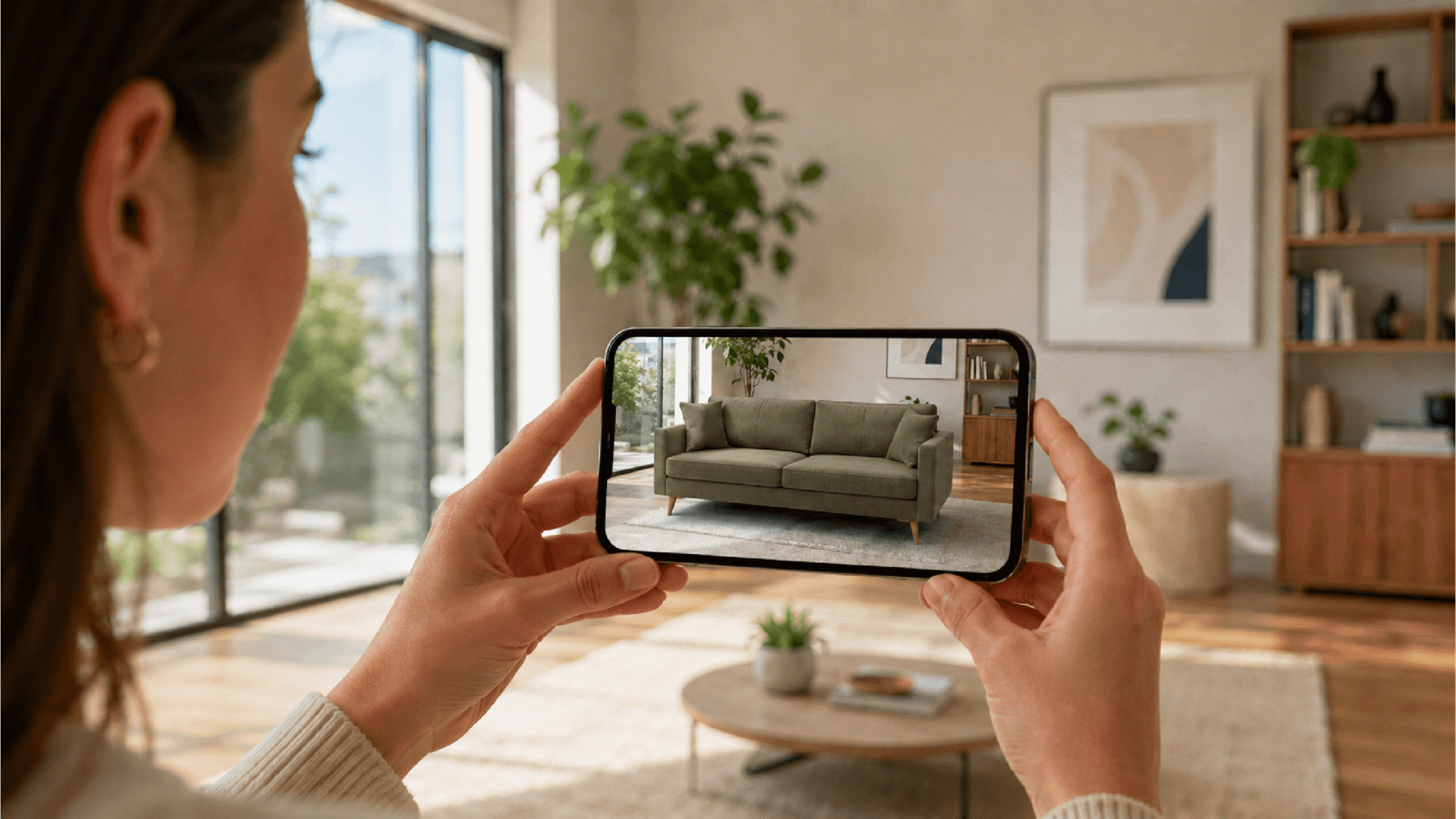
Furniture retailers are turning to AR to help customers better visualize everything from sectionals to rugs in their homes. Here are 15 AR marketing strategies, along with a downloadable tip sheet to target customers throughout the buyer’s journey.
Inside this article:
- How AR furniture placement works
- AR marketing ideas and examples
- AR furniture marketing tactical checklist
- How furniture retailers can promote their AR features
- Convenient way to power your furniture AR
Quick summary:
Augmented reality is reshaping how furniture retailers convert browsers into buyers. 3D Cloud’s 3D Commerce Index found that shoppers who interact with AR tools convert 35% more often than non-3D users, and retailers combining AR with a modular configurator see over 10% lift in revenue per session and a 25% reduction in returns. Strategies that drive results include prominent product page placement, QR codes in stores and catalogs, retargeting ads with AR deep links, and equipping store associates with shareable AR links. Real-world examples from CITY HOME, Jerome’s, and Raymour & Flanigan show how each approach works.
Why augmented reality matters in furniture retail
Augmented reality (AR) enhances the furniture-buying experience, eliminates guesswork, and reduces returns. AR shopping experiences are something that modern consumers are coming to expect. Furniture retailers need to provide it to stay competitive.  Beck Besecker, Founder and CEO of 3D Cloud “We’ve done some A/B testing with retailers and have seen that using interactive 3D features such as augmented reality and 360 spins can contribute to as much as a 35% lift in conversion rate,” explains Beck Besecker, Founder & CEO at 3D Cloud. “AR tends to be most impactful during the purchase process for customizable and big, bulky pieces like chairs and sectional sofas. In these categories, being able to understand fit in a real space offers a huge benefit to the user.” Other ways AR tools make a difference in furniture retail include:
- Increase sales: According to the 3D Commerce Index Q1 2026, which examines average usage and conversion rates among home and office users who interact with 3D spins or AR, those users convert 35% more often than non-3D users. Additionally, when a furniture website provides a modular configurator and AR, retailers see a more than 10% lift in revenue per session.
- Builds customer confidence: The 3D Cloud Furniture Shopping Trends Study 2026 found that 62% of shoppers say it’s a challenge to visualize how furniture will look in their homes. This lack of confidence can derail sales. 3D tools can help bridge the gap for customers and create an impact. These interactive tools empower customers to explore products in their space, play with customizations before purchasing, and take much of the guesswork out of design.
- Improves engagement: Providing shoppers something to interact with on a product detail page can increase engagement and time spent on the page. The 3D Commerce Index found that when a furniture website included a modular configurator with AR, engagement increases by 11%, and add-to-cart rates increase by 35%.
- Fuels creativity: It’s not always easy for consumers to picture how a piece of furniture might look in their space. AR provides this functionality so they can quickly see how an item might look with other pieces in the room and against their wall color without ever having to leave the house. Many online furniture stores even let customers change the color or finishes, and then use their smartphones to see the piece in their room. The more low-risk options people can view in a space, the more likely they are to try new things.
“Customers love the tech and have come to expect it from furniture retailers,” adds Besecker. “It doesn’t even require awareness marketing anymore. We see customers saving screenshots of their configurations, sending them to family members, and asking for input before they buy. That’s social behavior built into the shopping experience.”
How AR furniture placement works
With AR furniture placement, a customer uses their smartphone to view true-to-scale products in their real space. Pick a product on an AR-enabled website or app and place it virtually in a room. The phone’s camera and sensors work together to create a 3D map of the room. Depending on the furniture website, users can either view the product in their space using WebAR (view AR in a mobile web browser) or download an app to use the AR feature. For example, if a customer sees a couch on the IKEA website, they can download the IKEA mobile app, select the couch, and use their phone’s camera to scan the room where they’d like to place the couch. They can then see the scanned room on their phone’s screen and move the couch around. (See how the IKEA Place and other AR apps work.) The idea is that the furniture will be true to scale in the room. In reality, the AR experience gives a general sense of how the piece will look in a room. Customers definitely still want to measure or use a 3D room planner to make sure the couch they want will fit well in the room.
15 furniture AR marketing ideas and examples for 2026
These AR marketing ideas meet consumers where they shop. Find ideas for social media and working with influencers. We cover ways salespeople can use AR to optimize the in-store experience. There are fun examples of how shoppers can interact with AR at all stages of the buyer’s journey.
Put ‘view in your room’ where shoppers will actually see it
Many online shoppers don’t necessarily know that using AR to view furniture in a room at home is an option. That’s likely because some of the top retailers have the feature buried in another section of their website, such as the design services section. The optimal placement for the ‘view in room’ icon is where shoppers will see it at the moment of intent. Ideally, the icon/button with the phrase should appear on a product page, either near the price, in the photo gallery, or by the color selector tool if a product comes in multiple hues. A few companies, such as Bob’s Discount Furniture and Crate & Barrel, have started placing a ‘view in your room’ icon next to the product image or as a photo carousel option, respectively. 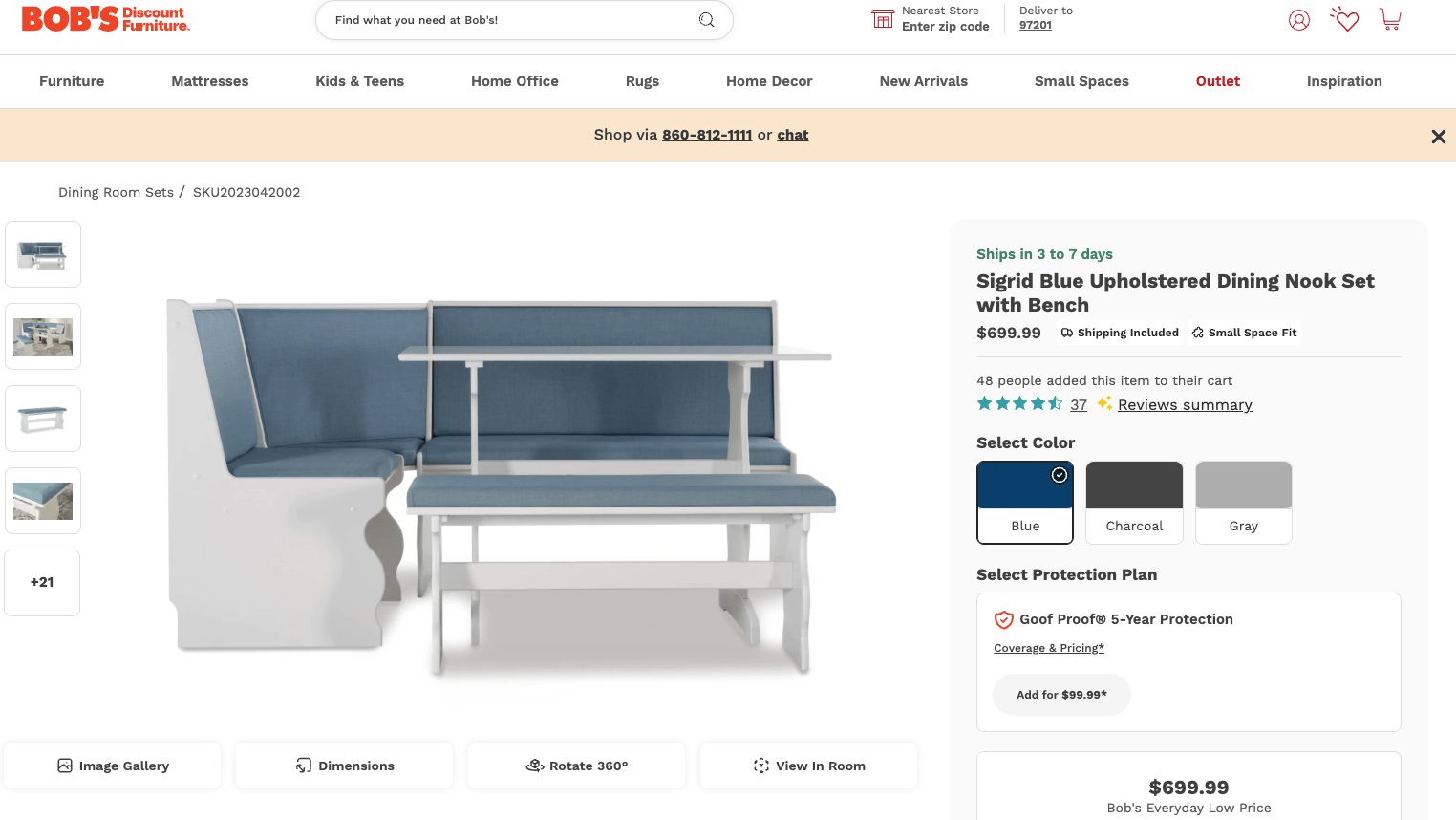 Placing the AR “view in room” functionality in a prominent place on a product page encourages customers to interact with the tool. The “view in your room” AR feature is also handy for shoppers who want custom pieces. For example, Raymour & Flanigan lets customers build a couch online. Once they launch that tool and create a custom couch, they can select the AR icon (which looks like a snowflake in the shape of a steering wheel) to see it in their room. They simply scan the QR code with their smartphone, and the WebAR experience launches on their phone.
 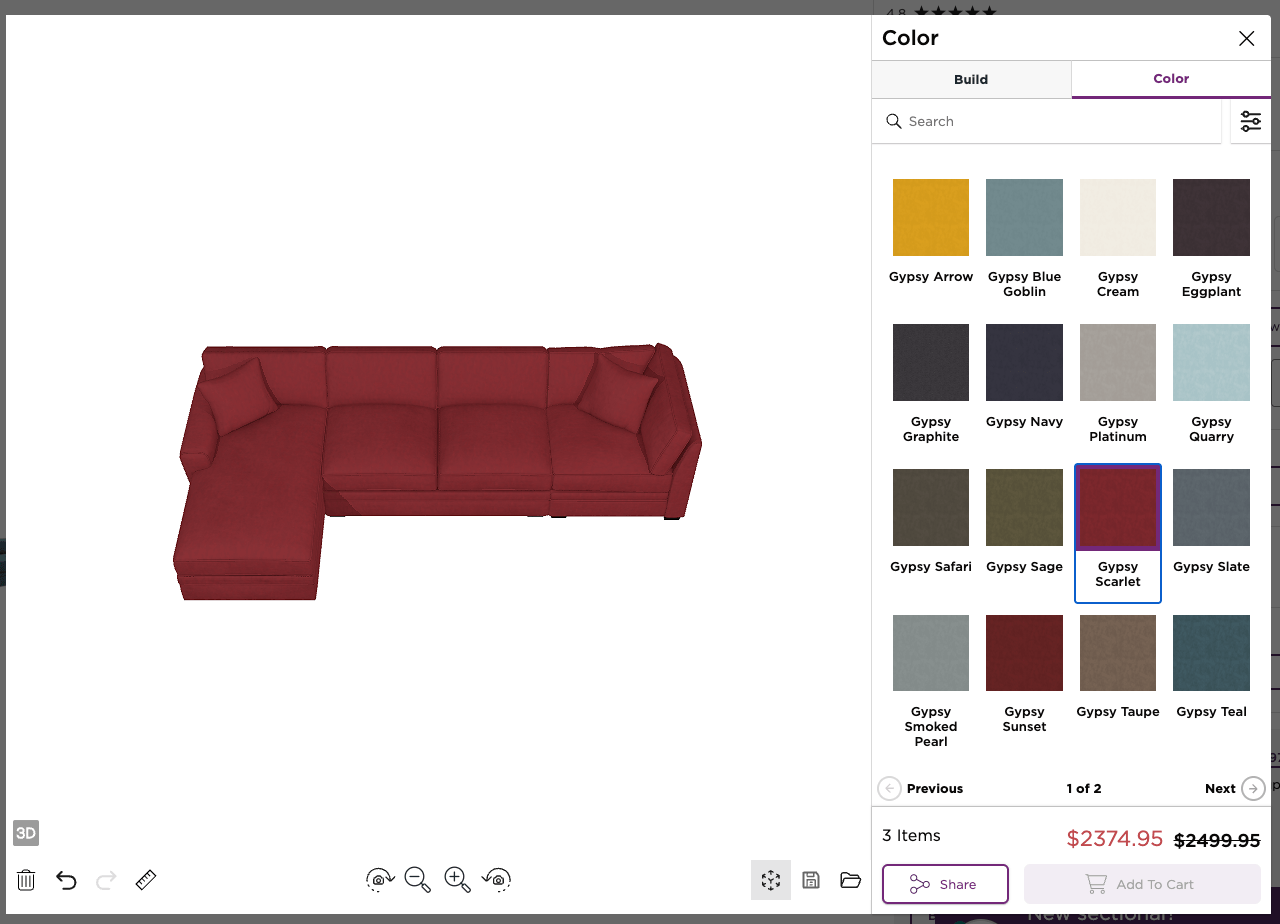 Building a sectional on Raymour & Flanigan lets shoppers use AR to view their creation in their home.
Add QR codes in catalogs and stores to launch AR
Using QR codes in your marketing efforts is an excellent way to encourage customers to interact with AR tools and bring people from the physical world into the virtual one. Shoppers can scan QR codes on store shelves or tags, or in catalogs, to launch AR on their phones. When they’re home, they can view the furniture they saw in the store in their space to better envision how it will look. Many Ikea customers use QR codes online to download the app or launch their Kreativ experience to scan a room with their phone. When shopping in the physical store, QR codes are posted around the store to help visitors check prices and launch the AR app, connecting the in-store experience with AR previews. Ikea has trained its customers to be comfortable using QR codes to interact with its inventory.
Let shoppers place multiple pieces (room sets) at once
Customers shopping for furniture sets typically appreciate the ability to virtually place multiple items in a room using AR. This functionality helps them better visualize if all the pieces they’re contemplating will fit well in the room. Retailers that sell everything from furniture to art to accessories can benefit greatly by offering shoppers the ability to virtually decorate an entire room using their inventory. CITY HOME offers multiple ways for its clientele to envision how items will look in their homes. They can use the CITY 3D Room Planner on their site to design a room that matches the measurements of one at home and fill it with furniture, accessories, and art from their inventory. They can then use the WebAR experience on their smartphone to see the scale of items in real life. All these tools are increasing engagement as 57% percent of users save their CITY HOME Room Planner projects for future purchase. 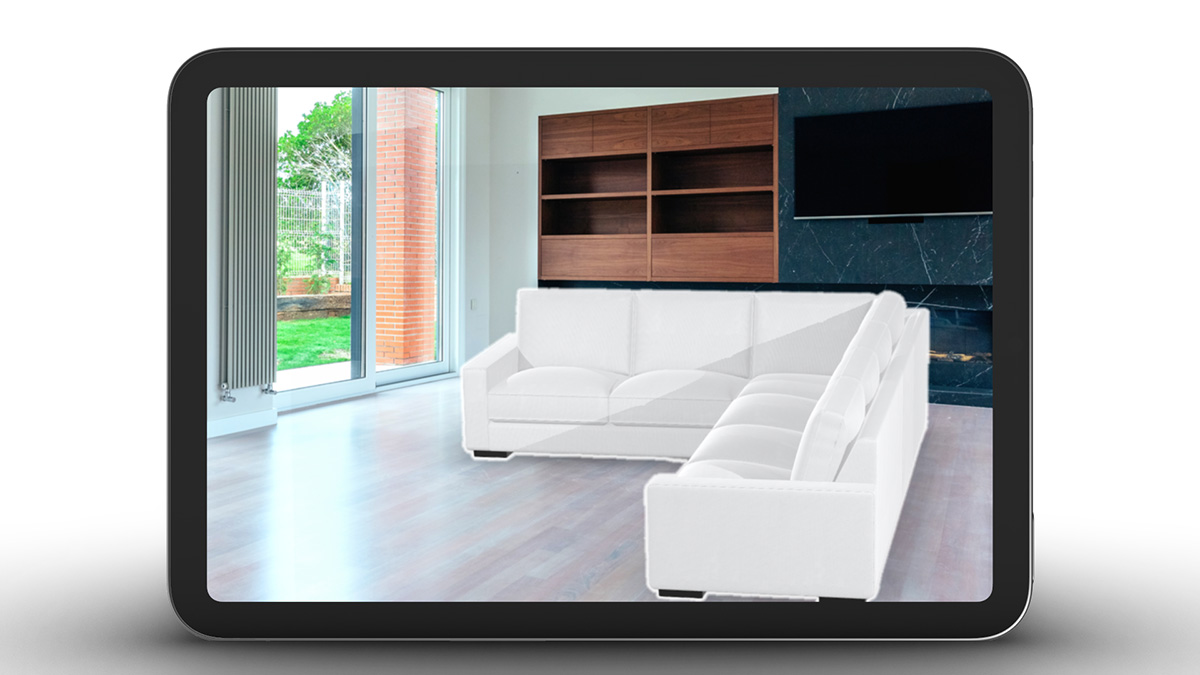 CITY HOME WebAR experience helps customers visualize multiple products virtually in their existing space. Use AR in retargeting ads (‘See it in your room again’) In some web experiences, accessing AR can take a few steps. Try using an AR deep link in retargeting ads to previous visitors. An AR deep link for an experience can take a user back to where they left off in the AR experience, making it easy for them to return to the product they were considering. With a targeted AR URL, retailers can track the effectiveness of the AR campaign across social media ads, emails, and QR codes, since it provides a way for marketers to track engagement and clicks. It’s also a useful way to run A/B tests on social media platforms to see which links (product details or AR) customers prefer. Retailers Jerome’s Furniture and CITY HOME are generating and sending WebAR-enabled product links to customers, prompting them to ‘see it in your room again.’ It’s a more interactive way to encourage customers to return to the abandoned cart. (Image: Retargeting ad with AR CTA concept)
Allow shoppers to switch colors and finishes inside AR
Many product detail pages for sofas, chairs, and tables with customization options feature 3D product spins and the ability to change colors and fabrics with just a click. This experience has been extended to AR as well, wherein once a shopper launches the AR view, they can customize it. IKEA for example, allows color switching in AR view before virtually placing it in their room so users can feel more confident about their purchase and how it will ultimately look in their space. 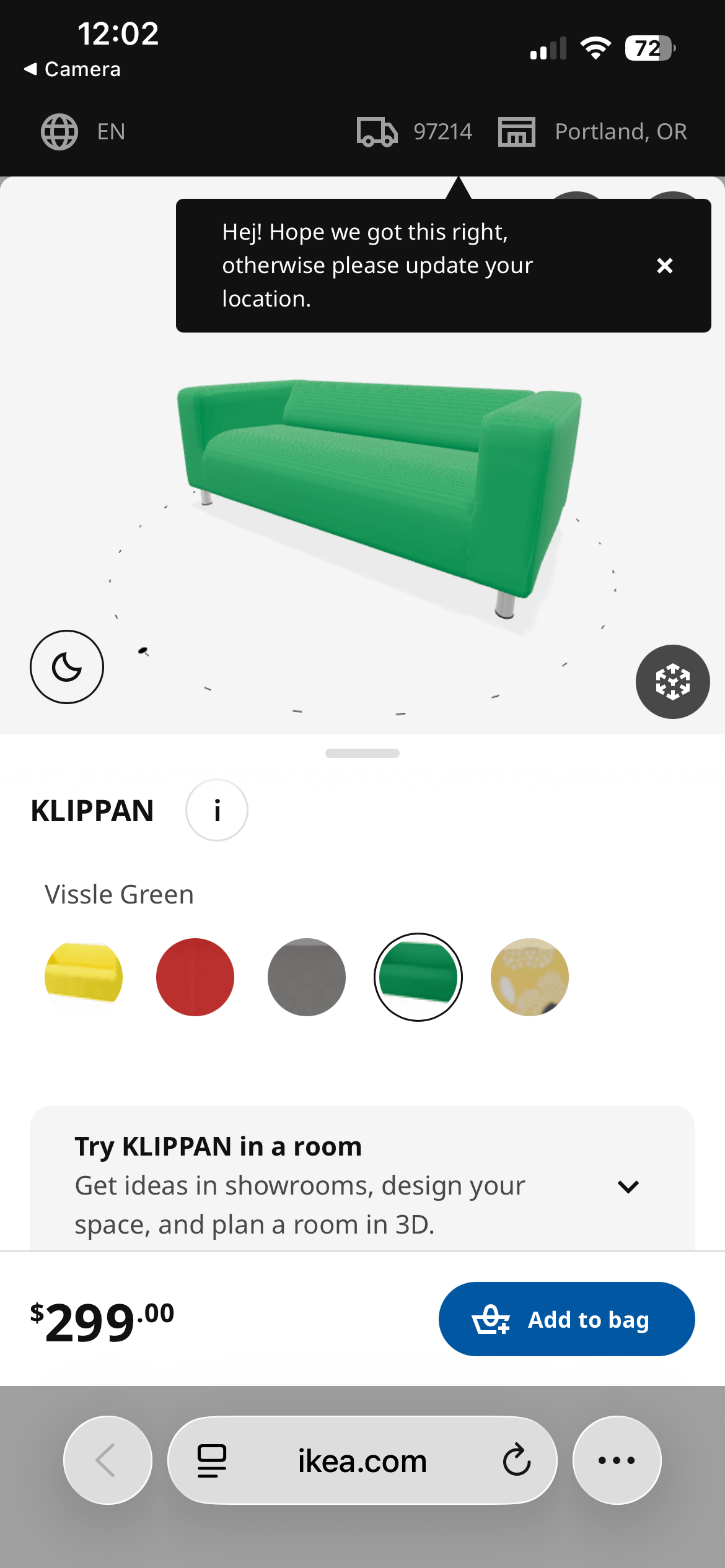 Shoppers can pick an IKEA couch to view in their room using AR and swap colors before virtually placing it in their room. No need to go back to the website to change colors.
Launch new collections with ‘Try it at home’ AR campaigns
A “try it at home” AR campaign is a fun, interactive way to generate excitement and interest among customers about new offerings coming soon. Companies can create AR previews of collections or seasonal items before they hit stores, allowing shoppers to start imagining how the product will look in their space and build anticipation. IKEA has incorporated AR into its Place and Kreativ experiences, allowing customers to preview new products in their homes before they are released.
Encourage customers to share AR screenshots on social media
There are many ways retailers can encourage customers to share screenshots of their AR creations on social media. People love to show off their creations, but sometimes they need a little inspiration. Have a contest and include branded hashtags to enter for a chance to win when they share their image on social media. Retailers should task their teams with reposting share-worthy AR design moments on their social outlets, as well. Consider rewarding customers with discounts or exclusive access to sought-after inventory for sharing screenshots of their AR room with your company’s furniture prominently placed. 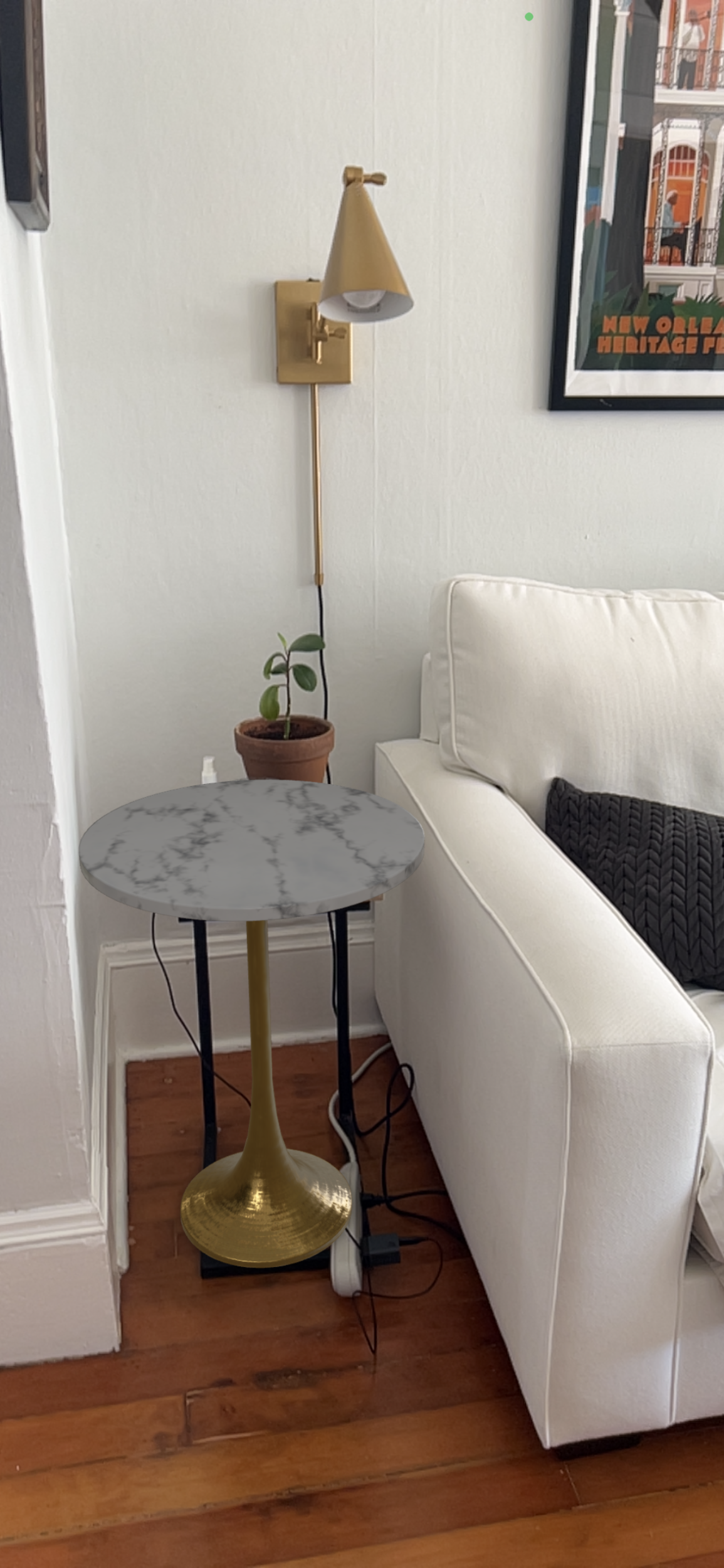 Checking out and sharing out a new side table virtually fits in a tight space. This type of social media strategy for AR room mockups extends organic reach, exposes products to a wider audience, and helps build social proof that could get others interested in trying the AR tool. Houzz is a community of professional designers and builders, homeowners, and home design enthusiasts who routinely share their designs with one another and on social media. The company’s “View in My Room 3D” AR-enabled feature allows users to view over 300,0090 products in their personal space. The company found that users were 11 times more likely to make a purchase associated with major conversion gains and naturally produce shareable room visuals.
Partner with influencers to create AR ‘room refresh’ videos
A furniture retailer can step up its social media marketing efforts by partnering with influencers to use AR to create “room refresh” videos and share them across its different channels. Home-decor influencers often use AR apps from IKEA or Ashley Furniture in their short-form content to show the dramatic change of their work with before-and-after visuals. “AR experiences can be difficult to capture in video, so I don’t know if influencers will drive future adoption. Social media influencers tend to feature room planning and rendering experiences over AR,” shares Besecker. Influencers are also instrumental for furniture retailers looking to tap into the millennial market, which doesn’t have an allegiance to a specific brand. An October 2024 study by the Home Furnishings Association found that 80% of Millennials are not tied to any specific retailer or brand. This demographic often turns to influencers for ideas, with 66% of those surveyed relying on Instagram for inspiration.
Equip store associates with AR links they can text to customers
Quickly bridge the gap between the physical store and how something will look at home by empowering store associates with tablets to send shoppers AR links so they can view the item in their own space. Once home, the customer can click on the link on their phone, scan the room where the piece is intended to go, and see how it looks. Making these links trackable can trigger workflows to follow up with the customer. A salesperson at CITY HOME can generate a QR code or shareable link directly from the View in Room button. They just need to right-click on View in Room and select Create a QR code. At that point, the customer either scans the QR code or the associate can copy the link and send it to them. Either way, this solution makes it easy for the customer at home to quickly locate the item they want, launch the AR experience, and see how it looks in their space.
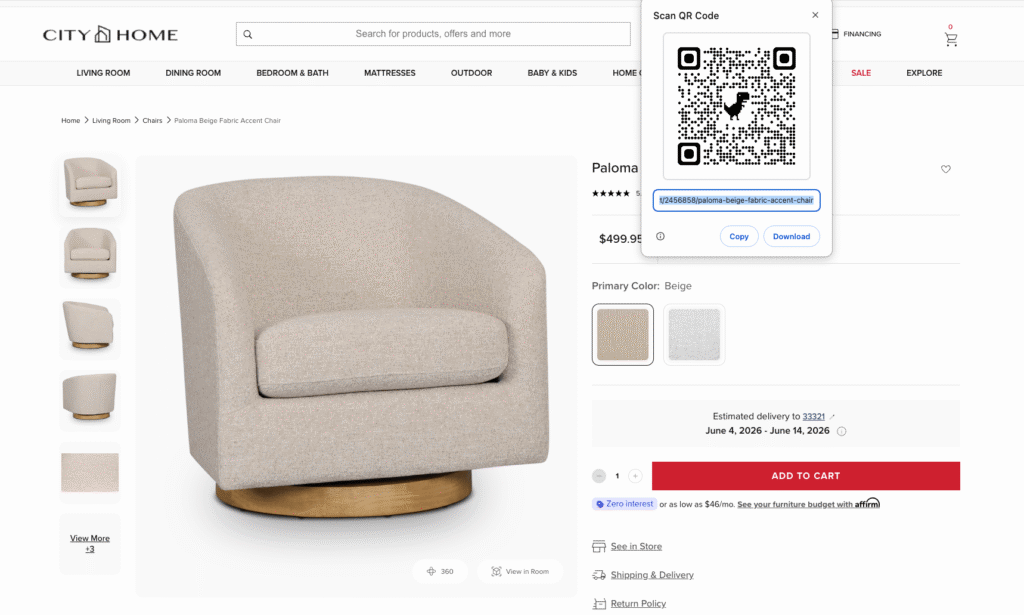
CITY Home associates can quickly create a QR code to share with shoppers so they can visualize furniture in their space when they get home.
Highlight AR first for oversized or high-return items
Deploying AR as part of the shopping experience, especially for large-sized or high-return products, can reduce costly returns. It’s important for customers to be able to get a sense of the size and fit of furniture they’re about to purchase will look in their space: Will it be just right or overwhelm the space? The 3D Commerce Index found that there’s a 25% reduction in returns when AR is used with a product configurator. Offering these tools also helps with sales, as the Index shows that when these two tools are present, there’s a 21% lift in conversions. “The tools that get used are the ones that show up where the decision is being made. Retailers that feature AR directly on product detail pages see the best results. La-Z-Boy and Raymour and Flanigan are both good examples. Making the tools visible at the product page level increases engagement,” says Besecker. Retailers should consider prominently highlighting the AR feature on product detail pages for large items such as sectionals or dining tables, so customers can easily find it. Companies like Amazon, Raymour & Flanigan, and Bob’s Discount Furniture provide dedicated “View in Room” buttons that launch a QR code that users can scan with their phone to launch an AR experience. 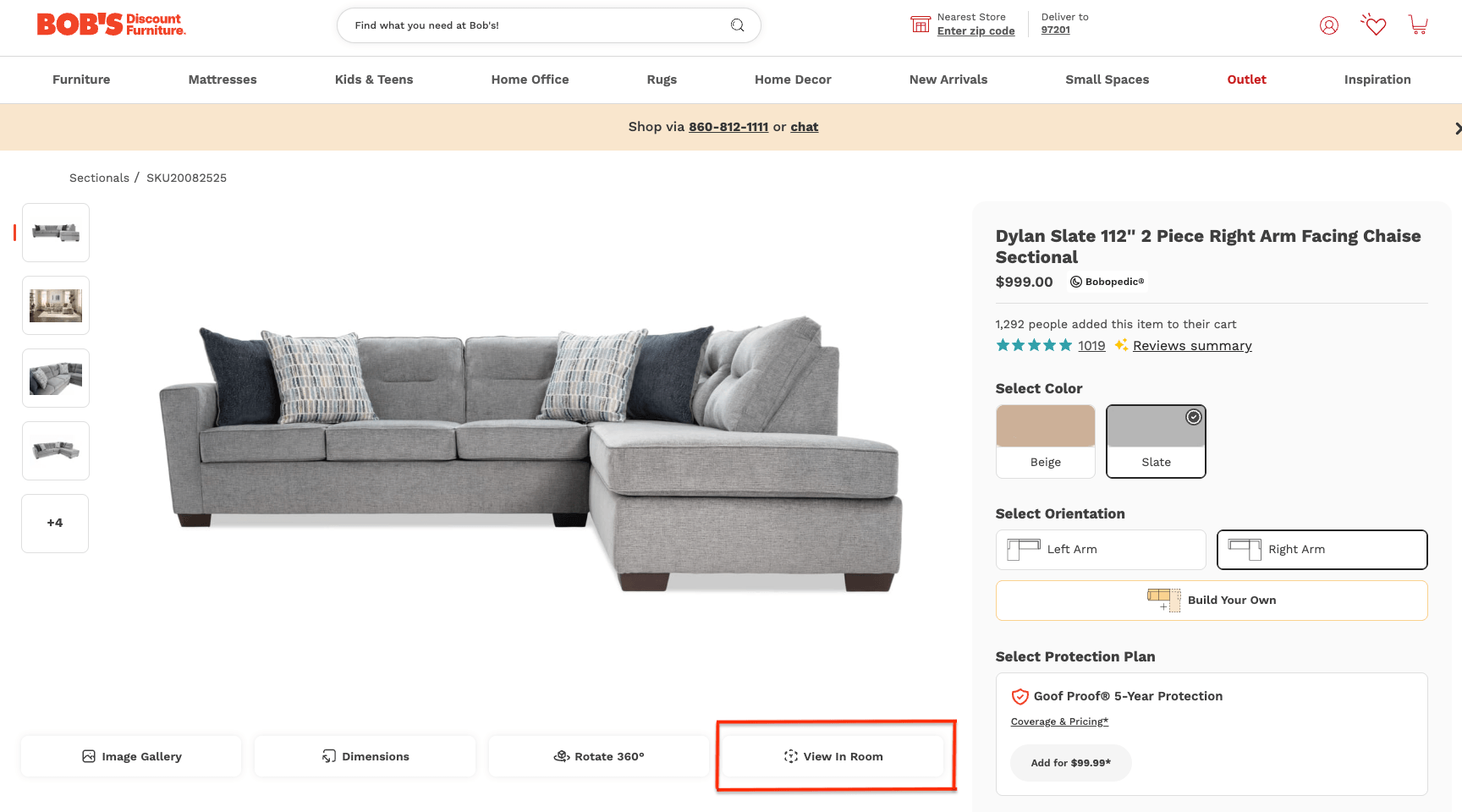 Bob’s Discount Furniture provides a dedicated button for the View In Room AR feature. Provide AR placement tips after purchase (‘Where to put it’) Shoppers can still use a combination of AR features and 3D room planner tools to map out how to place their furniture after purchase. Providing customers with a compact list of design principles and using AR can help guide their room layout. Be sure to include tips for optimizing the space before scanning the room. For example, remove any clutter and ensure the room is well-lit before scanning. These simple fixes will offer a richer experience. Then they can use AR to guide the spacing and placement of pieces in the room, and to determine the proper sizing for rugs. Some 3D/AR planning tools, like Houzz Pro, include advanced features, such as grids, to ensure pieces are placed parallel to walls and aligned with other furniture in the space.
Add AR to delivery scheduling or pre-delivery emails
AR is also useful for seeing if the item a customer just purchased will actually make it through the door of its intended location. CITY HOME and Jerome’s Furniture include a link to their WebAR catalogs in delivery emails so customers can visualize how the furniture will look in the room. Will that desk make it up the narrow staircase and around a tight corner? AR can help customers visualize it before delivery day and make any necessary adjustments. This tool helps minimize failed deliveries and reduce last-minute cancellations of products that leave shoppers disappointed.
Use AR to ‘complete the look’ by recommending complementary items
Furniture retailers can take a page from the fashion industry and offer customers options to complete a room's look through AR and online room planners. For example, when they scan a room with the IKEA Kreativ tool, they can use AR to place an item they’re considering, and the app will suggest other options for the space. Users can purchase everything in their cart. CITY HOME offers free design services that combine a 3D room planner and WebAR functionality to help customers visualize the completed look.
Compare AR engagement with traditional product photos
Shoppers who spend a lot of time on a product detail page that doesn’t offer an AR option and still don’t make a purchase are a signal that the page needs an update. The customer is clearly interested in the product, but the photos are not instilling confidence in the purchase. Whereas a similar product with better images, a larger variety, and AR options can make a difference. 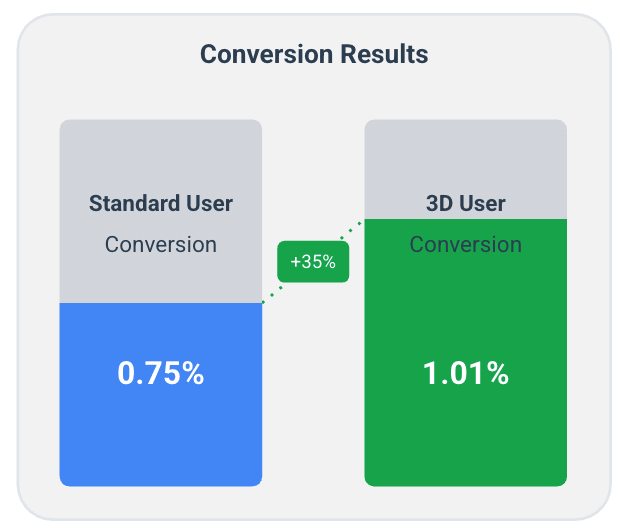 The 3D Commerce Index A1 2026 revealed that users who interact with 3D spins for AR convert 35% more.
Feature AR best-sellers in paid social campaigns
The products customers use AR to interact with and then purchase are ideal candidates for paid social campaigns. These tend to convert well in broader campaigns. Use phrases like “see it in your room” or “try AR” to encourage interaction with the social ad. The campaigns can include short videos showing an AR tool being used to place the popular furniture item in a room. For example, Jerome’s Furniture experienced up to a 300% increase in conversion rate when AR was used during a mobile shopping session. See more examples of augmented reality marketing campaigns for millennials and how AR is used in retail.
AR furniture marketing tactical checklist
This checklist gives furniture retailers AR marketing tactics organized by funnel stage — with a specific action and a proof point for each. Use it to identify which tactics fit your current priorities.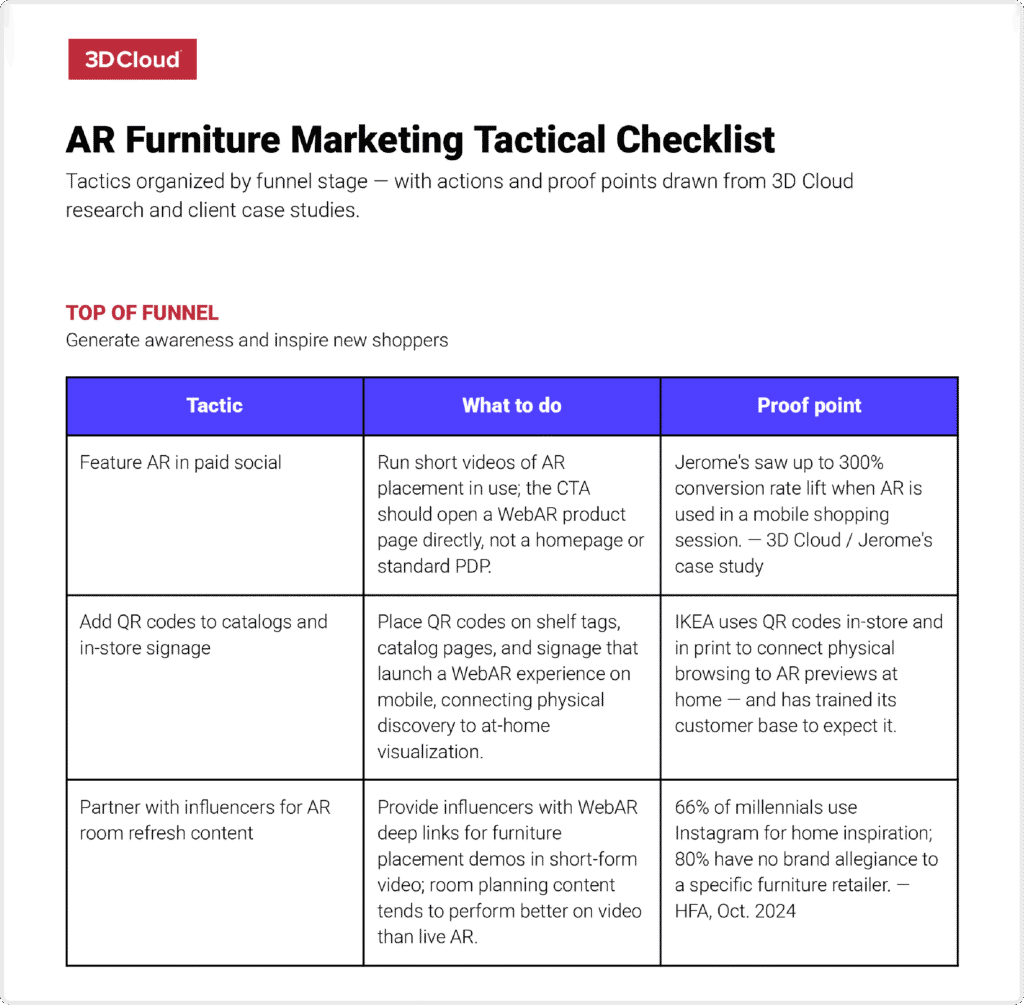 Download our tip sheet on furniture digital marketing ideas by funnel stage in Excel or PDF
How furniture retailers can promote their AR features
Furniture retailers can promote their AR features on and off their website. On their website, they can highlight AR on product detail and listing pages, and homepage banners. Offsite, they can include AR in email, SMS, paid social campaigns, influencer toolkits, in-store signage, and print catalogs. Here’s a look at tactics furniture retailers can use to promote AR features:
- Product detail page placement: When highlighting the AR feature, it should ideally appear above the fold and near the image carousel.
- Product listing page callouts: Include them either as an icon on the listing or as a bullet in the description. Run A/B tests to see which wording and placement yield the best results.
- Email: Feature the AR functionality in an email CTA button, using language such as “view in your room” or “see it in your space.” Retailers can also include a QR code in the bottom section of the email for desktop users.
- SMS campaign: Place AR links in SMS at the end of the message as a call to action. It’s best to send them to a WebAR experience rather than prompting them to download an app.
- Paid social: This platform is an opportunity to highlight the AR quality. Shoot a video of the AR tool placing a large table or sofa in a room. The CTA link should open in a WebAR experience of the product.
- Homepage banners: Place the “view in the room” CTA as a floating badge on a banner or as a button in the corner. Consider how the placement on a banner will look on a mobile device.
- Print catalogs: Include QR codes in the product details so people can view the item in their space.
- In-store: AR activation markers should be at eye level. They can be on price tags, signs, or shelving. They need to be within easy reach for someone to scan them with their phone.
- Influencer toolkits: As part of a partnership with interior designers or social media influencers, be sure to have them include deep AR links in their lookbooks or as part of their Instagram linktree and TikTok toolkits.
Future trends in AR for furniture retail
In the future, WebAR will likely become the preferred use case for consumers, rather than downloading an app. There will be a movement toward AI-assisted scanning and the ability to put multiple products in a WebAR view. Spatial commerce readiness, which combines AR, VR, and 3D modeling, will be a game-changer. “Over the next 6 to 12 months, you’ll start to see AI-enhanced AR applications that will create new value for furniture retailers,” says 3D Cloud’s Besecker. “Chat-based AI design agents will make it so much easier to configure and view products with AR. For instance, we have a patent for AI-based conversational configuration. The conversation can then be turned into a fully configured AR product that users can view in their own space.” Like many other industries, AI will play a role in AR. Companies will start to use AI-assisted scanning to generate digital overlays for AR, speeding up the entire AR visualization process. As consumers start to embrace the ability to view multiple products in a single AR space, ease-of-use and how quickly webAR can build a view will be vital. Spatial commerce readiness will improve the overall virtual shopping experience. Combining AR, VR, and 3D modeling into a single space will create a much more realistic view, giving shoppers more confidence and likely reducing returns, since large items like sectionals and dining sets often don’t fit properly in a space.
How 3D Cloud can help your furniture AR marketing
Furniture websites and apps with advanced product visualization can provide the edge you need to ensure that customers who shop with you, buy with you. 3D Cloud-powered WebAR and WebAR OnDemand are easy to deploy, manage, and integrate into e-commerce websites. The performance of a furniture website is crucial, as even a brief delay can lead to lost sales. Large products like sectionals, sofas, beds, and dining sets are among the top items customers use AR to interact with when shopping. 3D Cloud’s augmented reality content ensures rapid rendering, enhancing the overall customer experience and driving sales. With 3D Cloud-powered WebAR, customers can seamlessly navigate between product pages and add items to their shopping cart within seconds. This technology has resulted in a fivefold increase in products viewed and a threefold increase in add-to-cart rates for 3D Cloud WebAR users. 3D Cloud supports many of the top enterprise furniture retailers in the US, including CITY HOME, Jerome’s Furniture, Raymour & Flanigan, and Bob’s Furniture. Book a demo for your business to see 3D Cloud’s WebAR furniture solutions.
FAQ on AR marketing for furniture retailers
Do furniture shoppers need an augmented reality app?
Furniture shoppers will need to download an augmented reality app to view items in their space if that’s how the retailer has implemented AR. However, if the retailer has implemented WebAR for the view-in-room experience, shoppers will likely scan a barcode to open it on their phone.
Is WebAR better than an AR app for furniture?
WebAR provides a more seamless AR experience for shoppers because they do not need to download a separate AR app. Once someone downloads the app, it's up to them to remove it from their phone. With WebAR, that’s not the case.
What furnishings work best with AR?
The furnishings that work best with AR are those that someone will use. Customers tend to use AR most often when shopping for large furniture items such as sofas, sectionals, beds, and tables.