
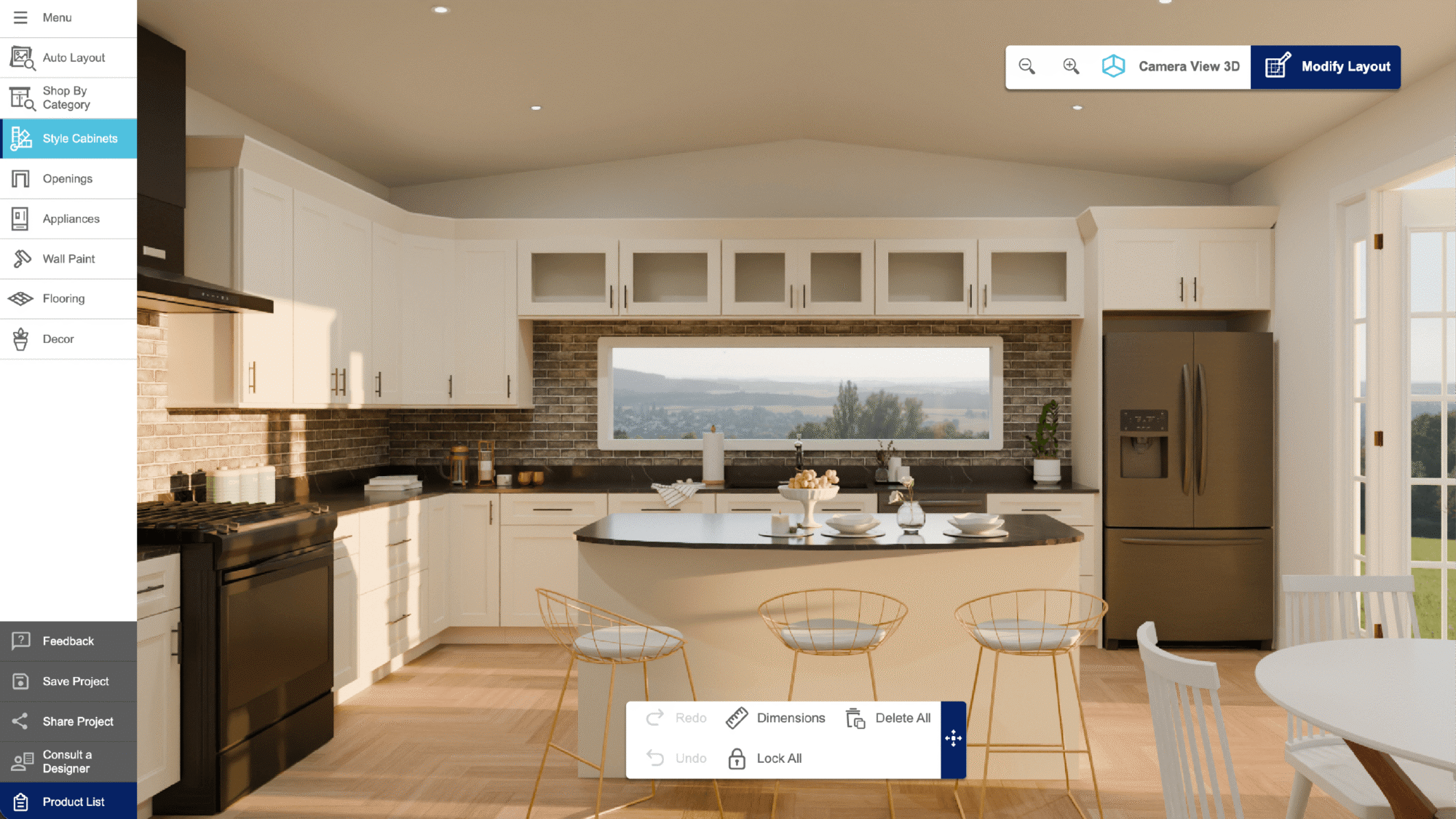
With over a decade of experience as an NKBA-certified kitchen designer, I’ve seen firsthand how 3D kitchen design software has transformed the professional workflow.
3D visualization is now essential. Previously, floor plans and elevations made it hard for clients to visualize. Today, platforms like 3D Cloud, 2020 Design, and Floorplanner offer photo-real rendering and automation for easier decision-making and advanced planning. Advances in AI and automation now streamline design and improve teamwork, freeing up time for creativity.
Choosing the right 3D tool reduces revisions and streamlines timelines, directly impacting sales and client satisfaction.
Article Summary:
This review highlights a pivotal market shift in 3D kitchen design software toward web-based, integrated solutions. While 2020 Design remains a staple for traditional desktop users and Floorplanner suits basic conceptualization, 3D Cloud emerges as the premier enterprise choice. It uniquely balances scalable professional tools with consumer self-service, offering superior browser-based accessibility and critical ERP/API integrations. To stay competitive, retailers should prioritize platforms that align product accuracy across channels and facilitate virtual collaboration. Ultimately, the industry is evolving away from isolated legacy tools toward connected cloud ecosystems that support both manufacturing precision and customer engagement.
What this 3D kitchen design software review covers
We tested 3D Cloud, 2020 Design, and Floorplanner by building the same kitchen in each of them. We compared usability, flexibility, render quality, and overall value.
This review is for professionals seeking 3D kitchen visualization tools to support business goals. We know technology should make design clearer and faster. Staying up to date on the latest developments in design software is a critical part of making informed decisions in the new industry landscape.
3D kitchen design tools reviewed:
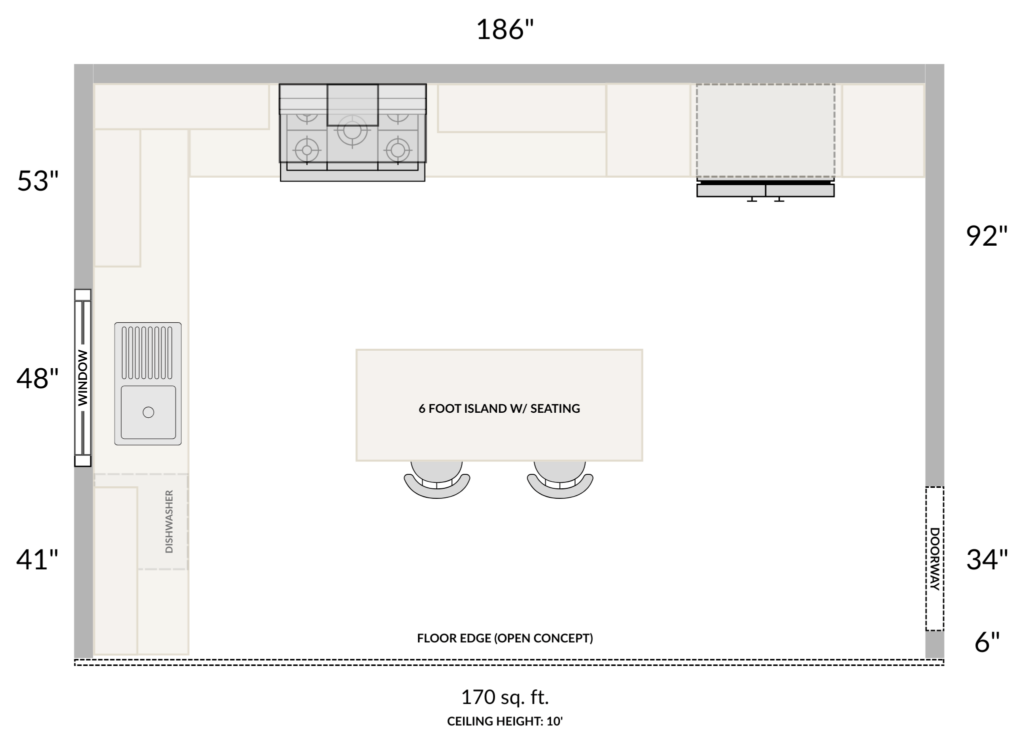
Example of a kitchen floor plan creation using 3D Cloud Kitchen Designer.
3D kitchen design software evaluation methodology
Test kitchen design project
We evaluated each tool using the same kitchen layout for fairness.
- Layout: 170-square-foot L-shaped kitchen with a 3-seat island.
- Appliances: Refrigerator, range + oven, vent hood, and dishwasher.
- Cabinetry: Base and wall units of varying types and sizes, including drawers, corner units, bridging cabinets, and pantries.
- Finishes and Details: White slab doors, standard toe kick, tile backsplash, and mid-range countertop materials.
Kitchen design process
We tested all tools in Google Chrome on a Lenovo Yoga 730 with Windows 11 Home 24H2. We created site accounts to access free features.
- Each test started with a blank workspace. We created each kitchen from scratch using only built-in tools and manufacturer catalogs to evaluate native platform capabilities.
- We then added products to the room, keeping cabinet and appliance sizes and types as similar as possible across all three tools, though not every configuration was available in every tool.
- After adding products, we adjusted styles, materials, and finishes. All designs used a white slab door style and a marbled white countertop.
- We added decor, set dimensions, and created presentations using each tool’s features. Some tools did not support all exports, so results varied.
3D kitchen design software evaluation criteria
During testing, detailed notes were recorded where relevant to the evaluation criteria listed below.
- Workflow & Ease of Use – How easy or difficult designing feels while moving through each step of the process, how much setup is required, and how intuitive product placement is.
- Catalogs, Content, & Customization – Availability, searchability, and usability of browsing content to find cabinets or other objects, and the overall ease of customization.
- Automation, Intelligence, & Efficiency Tools – How each tool reduces manual work through smart features, auto-placement tools, guidance, or reusable components.
- Precision, Technical Accuracy, & Measurement Tools – How well each tool handles automatic dimensions, precision of cabinet placement & alignment, and general plan accuracy.
- Visualization, Rendering, & Presentation – How successfully each tool handles 3D views, lighting, rendering quality, performance, and presentation exports.
3D Cloud Kitchen Designer software review
When I tested 3D Cloud, I found it to be a fast and modern platform that helps retailers and manufacturers create designs quickly and reduce errors. Product lists load quickly with the correct sizes. Features like Floor Plan Trace, Rapid Placement, Wall Fill, and Catalog Swap help designers work faster and more easily.
3D Cloud’s visual customization tools accurately display products without requiring complicated setup or memorizing SKUs. Other than a few minor workflow quirks, the experience was smooth and well-suited to retail design needs. It’s a strong option for speed, consistency, and presentations that are ready for customers.
Overview of 3D Cloud Kitchen Designer
- Cloud-based, browser-native platform built for the scaling needs of large retailers and manufacturers with extensive product catalogs; already in use by major enterprise home improvement retailers like Lowe’s Home Improvement and B&Q.
- Ready to use immediately, for designers or admins after launch, preloaded with catalogs and intuitive tools that speed up the drafting, layout, and configuration of products.
- Designed for rapid onboarding, with most designers able to complete full kitchen designs during training and an extensive self-service knowledge base to support continued learning. Core workflows can be learned quickly, giving the platform one of the shortest learning curves among the tools compared here.
- Automation features include Floor Plan Trace, Rapid Placement, Wall Fill, and Catalog Swap, which enable designers to quickly create accurate kitchen layouts while maintaining design intent.
- Impressive tools for visualization, such as optional Instant Renders with photorealistic output and 360° VR panoramas for immersive presentations. These features go a long way in supporting the accurate representation of products, thereby strengthening the potential for total alignment between retailers, customers, manufacturers, and installers.
- API and white-label options enable seamless integration within retailer ecosystems, complete with automatic shopping cart and bill-of-materials generation.
3D Cloud Kitchen Designer pros for manufacturers
- Real-time Catalog Management: Product data, pricing, and configuration rules are kept updated across all accounts and locations, reducing ordering errors.
- Scalable Content Management: Built for large, complex product lines with multi-brand catalogs, deep SKU structures, and thousands of configurable items.
- Catalog-Specific Guidance: Product rule enforcement ensures designers specify only valid combinations, protecting manufacturing accuracy and reducing rework.
- Enterprise Integrations: These integrations allow for designs to translate cleanly into production workflows and purchasing systems (ERP, order management, APIs).
- Automation Tools: Powerful features such as Wizard, Rapid Placement, and Catalog Swap guide the designer in using products consistently and according to the manufacturer’s specifications.
- Excellent 3D Visualization: High-quality visualization features ensure all product finishes, styles, and accessories are accurately represented, enhancing product fidelity. High-quality renders also enable VR views and design-from-photo capabilities, showcasing manufacturer products clearly and helping drive customer confidence in selected items.
3D Cloud Kitchen Designer cons for manufacturers
- Requires an ongoing subscription and dedicated onboarding/training.
- Full functionality depends on reliable internet connectivity.
3D Cloud Kitchen Designer pros for retailers
- Zero Installation & Fast Rollout: Being fully browser-based means no local IT footprint, making deployment easy across new stores or remote teams.
- Consumer Self-Service: Planners can be embedded directly on retailer websites, enabling shoppers to create designs themselves and then forward them to sales teams for quoting or follow-up.
- Omnichannel Presentation Tools: Photo-realistic renders, VR panoramas, and shareable design links to drive customer engagement online and in-store.
- Integrated Cart and BOM: 3D Cloud tools automatically generate bill of materials exports and transfer them into the retailer’s e-commerce system, ensuring smoother ordering and minimal manual entry.
- Streamlined Sales Workflow: Automation features such as Wall Fill, Rapid Placement, and Floor Plan Trace enable in-store and virtual associates to produce polished designs quickly. This improves conversion rates.
- Consistent Experience: Customers see the same products, prices, and styles whether they start online, in-app, or in-store.
3D Cloud Kitchen Designer cons for retailers
- Subscription costs may be higher than freemium tools.
- Requires a consistent internet connection for smooth performance.
Room creation using 3D Cloud Kitchen Designer
As noted above, each test started with a clean slate. We used the Floor Plan Trace function in 3D Cloud by loading a scaled floor plan and setting one known wall measurement to establish valid dimensions. All walls were still drawn by hand using 3D Cloud’s drafting tools, but with the floor plan visible on the canvas, there was no need to look back and forth between a separate drawing and the screen. This reduced friction at setup and enabled a more integrated and accurate starting point for creating rooms. Doorways, openings, and structural elements were then added using only 3D Cloud’s native tools and manufacturer catalogs.
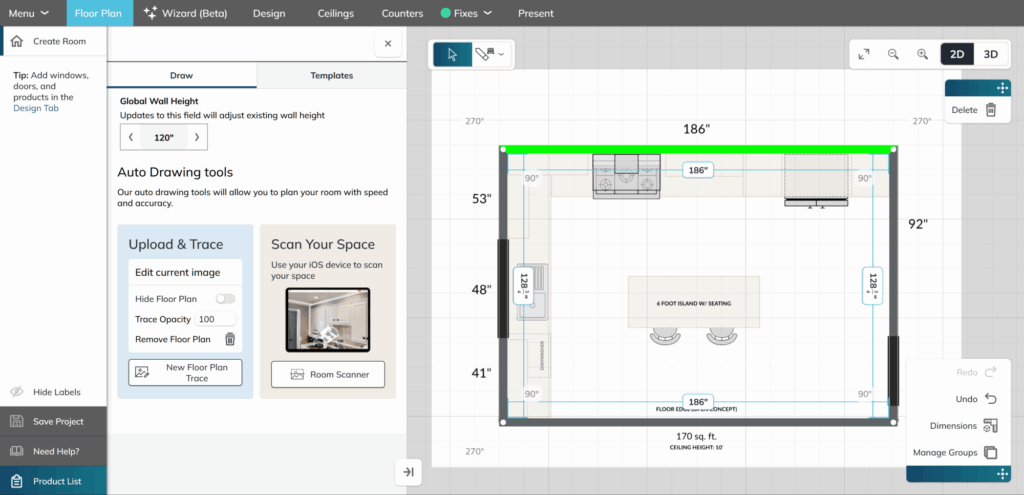
Room creation in 3D Cloud Kitchen Designer using Floor Plan Trace and manual drafting tools to outline walls and structural elements for an accurate and integrated kitchen layout.
Adding & positioning products using 3D Cloud Kitchen Designer
With the room defined, cabinets and appliances were set in place, along with other core elements, using preloaded catalogs from 3D Cloud. We chose cabinet and appliance sizes that closely align with those used in the other tools, making changes only when specific configurations were not available. Placing the cabinets depended on snapping behavior, the Rapid Placement feature, and the Wall Fill tool.
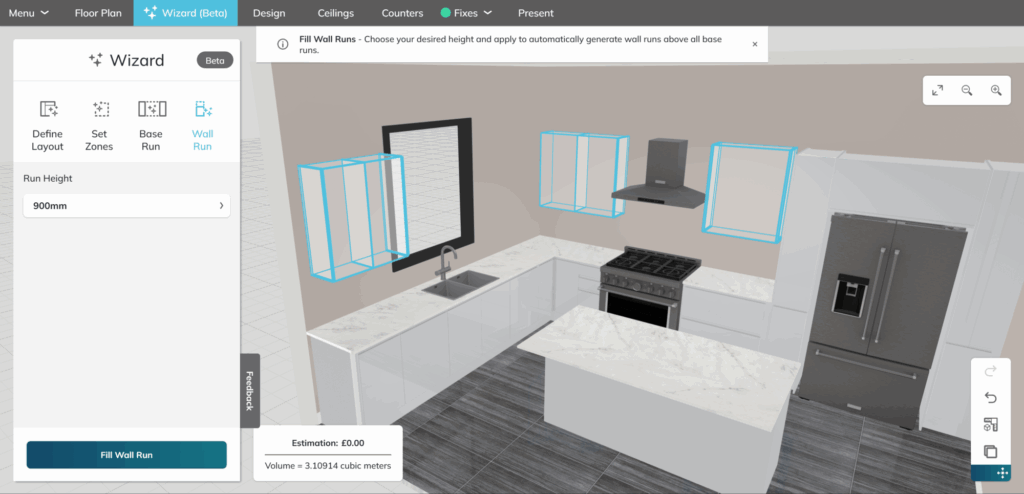
Placing cabinets and appliances in 3D Cloud Kitchen Designer using preloaded catalogs, snapping, Rapid Placement, and Wall Fill for fast, accurate layout configuration.
Customization using 3D Cloud Kitchen Designer
Once the initial layout was set, we applied a white slab door style, a white marble countertop, and matching accessories.
We also assessed the clarity, usability, and product fidelity of 3D Cloud’s customization tools, with a primary focus on their impact on retailers and manufacturers that rely on clear catalog representation. For example, while editing the width of a cabinet, we noted that the size entry was appropriately limited to a maximum size due to manufacturing limitations. Internal accessories that no longer fit were automatically removed from the listed options, preventing accidental addition of modifications that are incompatible with the cabinet’s size.
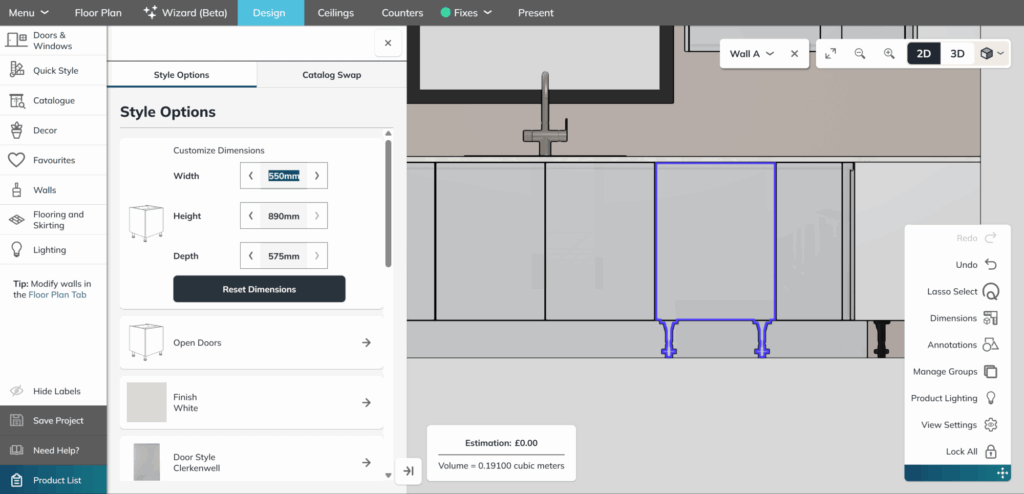
Customizing a kitchen in 3D Cloud Kitchen Designer with white slab cabinets and marble countertops, showcasing smart constraints, accurate sizing, and catalog-driven product fidelity.
Presentation using 3D Cloud Kitchen Designer
With the design complete, we added decorative products where appropriate, configured dimensions, and created presentations using 3D Cloud’s built-in tools. We tested HD renders, lighting adjustments, alternative camera angles, and available export formats. Since 3D Cloud supports photorealistic rendering and 360° VR panoramas, we evaluated how effectively retailers and manufacturers can use these outputs for sales, visualization, and channel alignment.
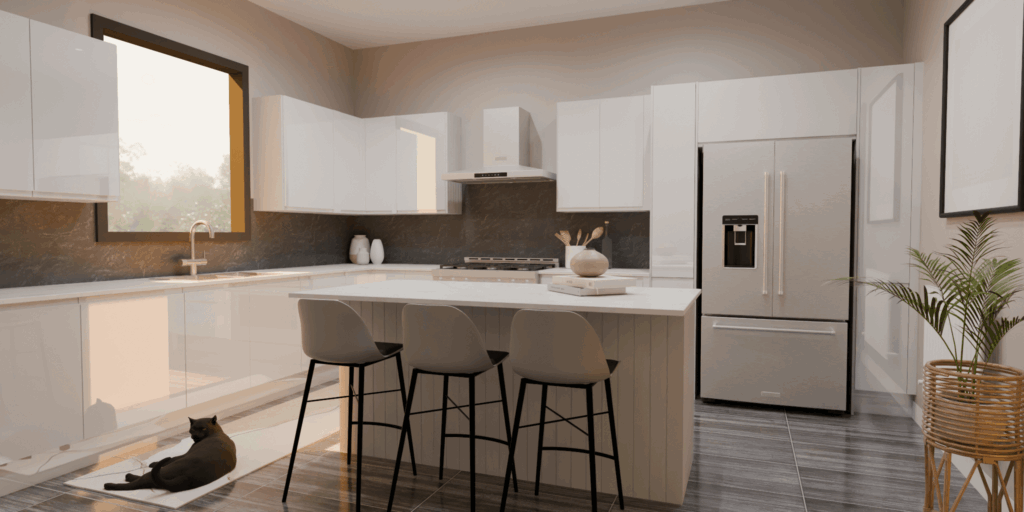
Presenting a completed kitchen in 3D Cloud Kitchen Designer with HD renders, lighting, camera angles, and 360° panoramas for impactful visualization and sales-ready outputs.
Final takeaway for the 3D Cloud Kitchen Designer
Overall, the 3D Cloud Kitchen Designer provides a seamless, well-structured workflow that aligns with the needs of both retailers and manufacturers.
The platform itself feels fast, polished, and intentional, with tools that anticipate real design behavior rather than forcing workarounds. Features like Floor Plan Trace, Rapid Placement, Wall Fill, and Catalog Swap made it easy to move from a blank room to a detailed layout quickly. Products load instantly, dimensions behave predictably, and product configurations follow rules that help prevent errors in downstream quoting and ordering.
3D Cloud’s kitchen design platform is clearly built for rapid onboarding and streamlined workflows. According to the company, its “Consultation-to-design” workflow can be completed in under 30 minutes, and typical session durations are 5-10 minutes once you’re up and running (developers.3dcloud.com). The platform comes with a fully-featured self-service knowledge base and designer training materials, making it easy for users to continue learning beyond the initial sessions (3D Cloud). Additionally, public product pages highlight that designers can build and furnish a full floor plan in 10 minutes and design a kitchen in 15 minutes using the tool (3D Cloud). Because of this emphasis on speed and self-service learning, 3D Cloud offers a much shorter learning curve than more traditional, heavy-duty CAD tools like 2020 Design.
Visualization tools also stood out, as instant renderings, lighting controls, and VR panoramas enabled teams to produce customer-ready presentations directly in the browser, rather than relying on external software. The opening of cabinet doors, preview of accessories, adjustment of lighting scenes, and true-to-catalog product fidelity create a fluid sense of design intent across teams, installers, and end consumers.
There is still room for refinement. For example, having window placement in the same workflow stage as wall creation would improve drafting continuity. Some render styles did not display cabinets through the countertops in floorplan view. But these are minor compared to the overall experience. For retailers and manufacturers seeking a platform that supports omnichannel design, product accuracy, and enterprise-scale integration, 3D Cloud is a modern, capable solution for current needs and future growth.
If your organization is considering kitchen design platforms that require speed, accuracy, and scalability, with seamless integration across digital and in-store experiences, then 3D Cloud is worth serious consideration.
2020 Design software review
2020 Design is a long-established kitchen design platform that many designers have used for years, and that familiarity remains its strongest advantage. It includes the core functionality needed to build layouts, specify cabinets, and generate presentations. For teams who have invested years in learning it, the workflow will feel recognizable.
However, side-by-side testing showed that the tool requires significant configuration, troubleshooting, and workaround knowledge before it becomes efficient. Several features felt fragile or inconsistent, including the Cloud Browser, lighting catalogs, UI scaling, and rendering performance. While the software can produce accurate layouts in skilled hands, the overall experience is slower, more manual, and more prone to interruptions than alternatives, especially for enterprise retailers or manufacturers who rely on speed, consistency, and reliability across multiple locations.
Overview of 2020 Design software
- Long-standing, desktop-based platform widely used across the design industry, with strong familiarity among seasoned designers.
- Offers extensive manufacturer catalogs, though many require manual download, local installation, and maintenance.
- Highly configurable, but designers often need substantial time to adjust dimension styles, UI settings, and display preferences before achieving an efficient workflow.
- Requires about 32 hours of formal instructor-led training for Levels 101 and 201, plus additional paid e-learning modules. The online help center and community forums offer extra support, but the overall onboarding time is significantly longer than other tools in this review.
- Performance depends on local hardware; live 3D views and render previews can lag even on modern machines.
- Some newer features feel inconsistent or plan-dependent, and reliable use may require troubleshooting to ensure optimal performance.
- Familiarity offers comfort to long-time users, though this comfort often comes from experience rather than intuitive interface design.
2020 Design pros for manufacturers
- Industry Familiarity: Many designers and retailers are familiar with the software, reducing the need for retraining across legacy teams.
- Established Catalog Ecosystem: Long history of supporting manufacturer-specific content with detailed product listings.
- Precision Capabilities: When fully configured, the platform can support detailed specifications and accurately place products.
- Mature Toolset: Decades of development have yielded a comprehensive range of functions utilized in traditional cabinet design workflows.
- Alignment with Legacy Processes: Fits well into established workflows used by long-standing retailers and dealer networks.
2020 Design cons for manufacturers
- High Maintenance Requirements: Frequent catalog updates, downloads, and version control create variability across users and locations, increasing maintenance needs.
- Limited Rule Enforcement: Designers may unintentionally specify invalid combinations, increasing the risk of manufacturing or ordering errors.
- Unreliable Access to Content: During testing, we encountered several issues with the 2020 Cloud Browser not functioning properly. Since 3D objects are being moved from the old browser to the new one, this is somewhat concerning.
- Hardware Dependency: Performance varies quite a lot depending on the computer’s specifications.
- Difficult to Learn: Creating accurate designs in 2020 often requires extensive experience, manual adjustments, and remembering product codes.
2020 Design pros for retailers
- Designer Familiarity: Many designers are familiar with the tool, which reduces the need for retraining.
- Comprehensive Toolset: Contains the foundational features needed for kitchen plans, elevations, and 3D views.
- Manufacturer Catalog Access: Retailers aligned with supported brands can access their catalog content directly.
- Consistency with Long-Standing Processes: This approach is particularly effective for retailers that have been using the software for many years.
2020 Design cons for retailers
- Slow Onboarding Due to Complexity: New designers face a steep learning curve and must adjust many settings before the software becomes efficient.
- Instability in Key Features: The Cloud Browser may fail to load decor or lighting content, interrupting customer-facing workflows.
- Performance Limitations: Live 3D views and render previews can be slow, which may impact consultations and the overall customer experience.
- Fragmented Access to Content: Lighting, accessories, and some tools require separate downloads or upgraded plans.
- UI Scaling Issues: Tiny or partially hidden interface elements reduce speed and usability across different store devices and monitors.
- Inconsistent Presentation Tools: Some features rely on external programs or require contacting sales, making it harder to create seamless customer presentations. Even at best, it can take an hour or more to assemble a presentation after a design is complete.
Room creation using 2020 Design
Each test began with a blank workspace, and as with all platforms evaluated, the room was drawn manually from scratch. Unlike tools that allow you to place a floor plan directly onto the canvas as a reference image, 2020 Design does not support a trace feature. The scaled floor plan had to be viewed in a separate window while manually recreating the walls in the software. This required frequent back-and-forth to verify measurements, making the initial drafting process more time-consuming. Doorways, openings, and structural elements were added using 2020’s built-in libraries. Some items were difficult to locate or required additional catalog downloads.
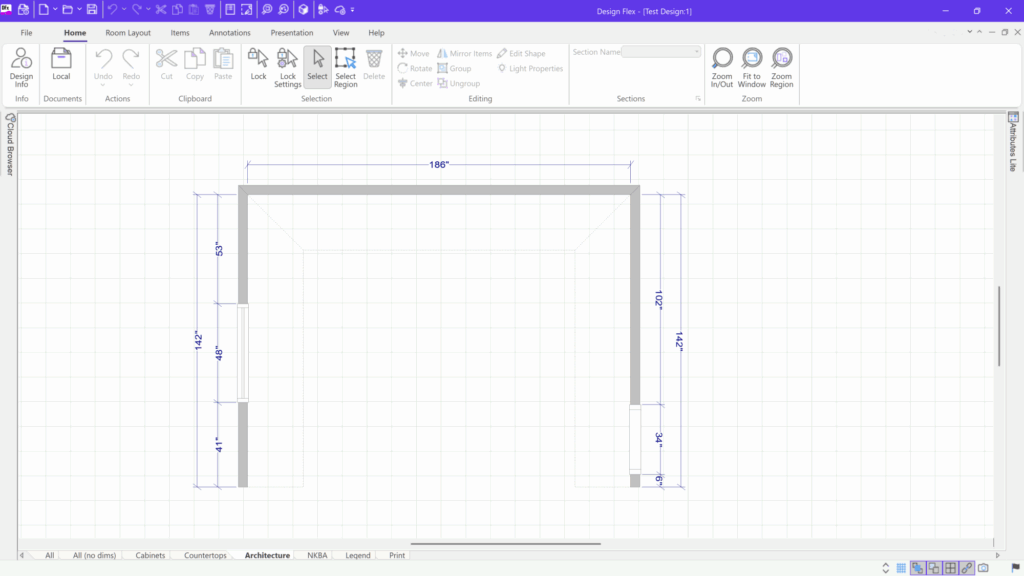
Room creation in 2020 Design with manual wall drafting from a blank workspace—referencing external floor plans and using built-in libraries for doors and structural elements.
Adding and positioning products using 2020 Design
Once the room was complete, cabinets, appliances, and other core products were added using the sample catalogs included with the testing plan. Catalog content loads locally rather than through a real-time system, which makes browsing slower and heavier. Some cabinet sizes and configurations were unavailable or difficult to locate, and the Cloud Browser, intended to provide access to additional items, was unreliable during testing. Cabinet placement was precise when snapping worked, but alignment often required manual numeric entry or repeated repositioning to achieve accuracy. Performance in perspective was impacted by resource usage on the test machine, and the software occasionally lagged during product placement.
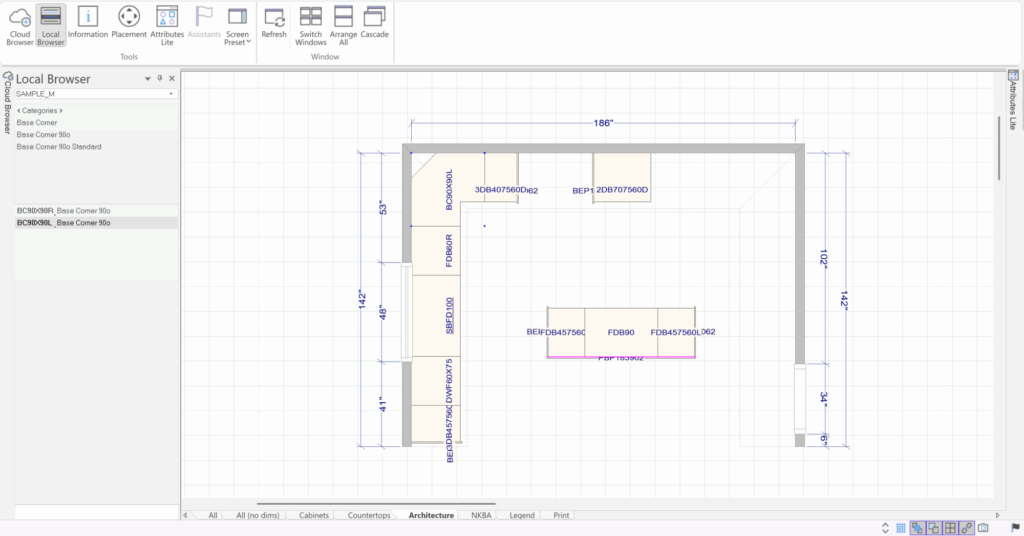
Adding and positioning cabinets and appliances in 2020 Design using local catalogs, with precise but manual alignment, limited configurations, and occasional performance lag during placement.
Customization using 2020 Design
We applied the same finishes used across all tests, including white slab-style doors, a marbled white countertop, and coordinating materials. Customization in 2020 required navigating detailed settings menus and configuration panels. Some essential catalogs, such as lighting, were not available by default and required extra installation steps. In some cases, the Cloud Browser did not load, limiting access to decorative items and outdoor scenery.
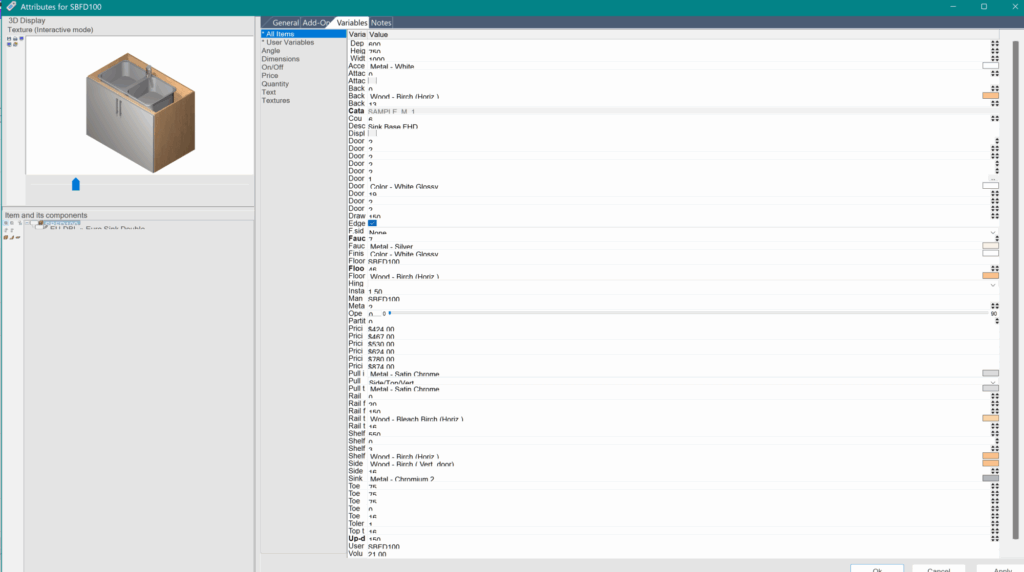
Customizing in 2020 Design with white slab cabinets and marble countertops, navigating detailed settings and limited by missing catalogs and unreliable Cloud Browser access.
Presentation using 2020 Design
While adding decorative items to the room, the 2020 Cloud Browser froze up. As a result, we were unable to maintain consistency with decor from other tools tested, and it was not possible to include outdoor scenery. Additionally, keeping the 3D perspective window open seemed to slow down the software. The final result was usable, but it required more manual work than the other tools.
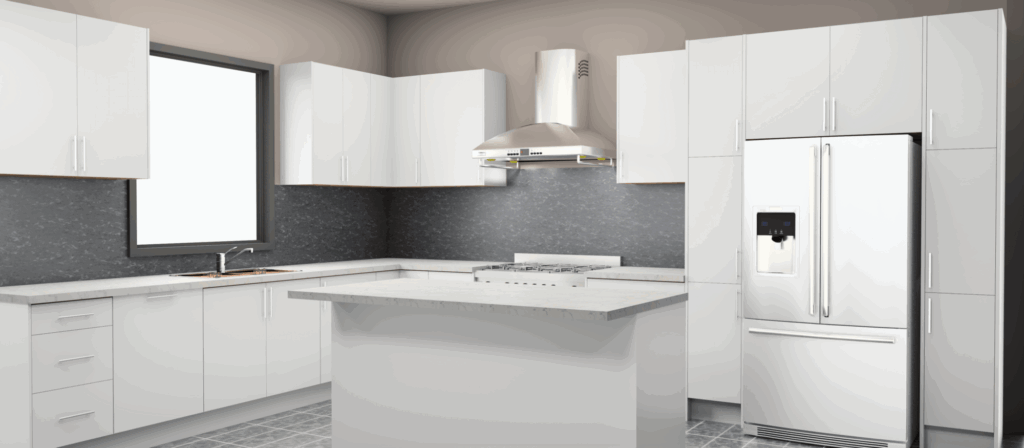
Presenting a kitchen in 2020 Design with limited decor options due to Cloud Browser issues, slower performance in 3D view, and a more manual workflow overall.
Final takeaway for 2020 Design
2020 Design is a familiar, long-standing tool that many kitchen designers have used for years. Experienced users can create accurate layouts and detailed drawings, and the platform works well for some small dealers and independent designers who like desktop-based workflows.
However, testing revealed that the system requires extensive manual setup and adjustments before true efficiency is possible. Catalogs had to be downloaded and updated; the Cloud Browser did not work reliably, and some parts of the interface were difficult to use due to button size issues. How well it works depends a lot on the designer’s computer. Many tasks required multiple steps, making the process slower and more fragmented than native cloud-based platforms.
For retailers and manufacturers that require speed, consistency, large-scale rollout, and accurate product details, these limitations matter. 2020 Design doesn’t offer real-time catalog updates, built-in product rules, omnichannel support, or enterprise-level integration. While it still works for teams accustomed to its workflow, it won’t likely meet the needs of organizations that are growing, modernizing, or trying to unify design and sales across channels.
Additionally, Cyncly’s 2020 Design software requires a significant training commitment before new designers reach a steady level of confidence. The company’s structured curriculum schedules about 16 hours of instructor-led training for Level 101 and another 16 hours for Level 201 when taken online (each course: 8 sessions × 2 hours) or two full days in a classroom setting. (cyncly.com) This places the formal onboarding period at roughly 32 hours of structured training before designers begin to feel fluent in the basic workflow.
While Cyncly also offers an online help center and community forums that provide ongoing support, these tend to supplement rather than replace the formal coursework. Even with these resources, 2020 Design typically requires significantly more ramp-up time than 3D Cloud or Floorplanner.
If your business requires fast workflows, accurate catalogs, customer-facing design, or easy scalability, consider comparing 2020 Design Flex with newer cloud-based options.
Floorplanner software review
Floorplanner is a simple, user-friendly design tool intended for general consumers, rather than those specializing in kitchen design. It is quick to learn, fast to set up, and flexible for basic room layouts, offering a large library of architectural elements and decor.
However, when used for a detailed kitchen project, its limitations became clear: measurements are imprecise, cabinet catalogs are inconsistent, snapping is unreliable, and many essential kitchen-specific features are missing.
While Floorplanner is easy to use and affordable, it lacks the depth, product accuracy, and reliable workflow that kitchen retailers and manufacturers require for professional design.
Floorplanner overview
- Simple, web-based design platform with no installation required. Designed primarily for consumer and light professional use, this product offers a friendly and intuitive interface.
- Includes basic drafting and 3D viewing tools suitable for general interior layouts.
- Boasts a large library of general 3D objects, structural fixtures, and decorations.
- Provides basic image-making features, with better quality available if you pay for upgrades.
- Better for conceptual visualization than for detail-driven kitchen designs.
Floorplanner pros for manufacturers
- Low Cost: Affordable pricing makes it accessible for basic visualization needs.
- Easy to Implement: Web-based and simple to deploy, with minimal setup required.
Floorplanner cons for manufacturers
- Limited Catalog Integration: Doesn’t support custom or semi-custom cabinetry catalogs.
- No Configuration Management: There is very little guidance indicating which style adjustments and combinations are allowed per manufacturer constraints, which can lead to costly mistakes.
- Minimal Customization Options: Limited support for detailed product modifications or interior cabinet accessories. No crown molding, gap fillers, or end panels available.
Floorplanner pros for retailers
- Easy to Use: Designers and customers can begin using the tool with little training.
- Affordable Pricing: Ideal for teams requiring basic visualization at a budget-friendly cost.
- Quick to Implement: The web-based structure enables fast rollout.
- Good for Basic Presentations: Suitable for early-stage concepts or simple room layouts.
Floorplanner cons for retailers
- Limited Professional Features: Missing many kitchen-specific tools necessary for accurate design consultations.
- Basic Visualization Quality: Renders and 3D views are simple and may not meet expectations for high-end presentations.
- Minimal Business Tool Integration: Lacks advanced features such as quoting, bill-of-materials, or shopping cart integration.
Room creation using Floorplanner
Each test began with a blank workspace, and as with all platforms evaluated, the room was drawn manually from scratch. Floorplanner does not support a floor plan trace or background reference feature for accurate scaling, so the scaled layout had to be viewed separately while recreating the walls in the software. This required switching between windows to confirm measurements. Floorplanner uses a feet-and-inches input system that does not allow inches alone, which adds extra steps when working from dimension sets provided in inches. Walls are automatically cut away in 3D mode by default, so the settings menu had to be adjusted early to view the full room. Once the walls were in place, doors and windows were added from Floorplanner’s structural library.
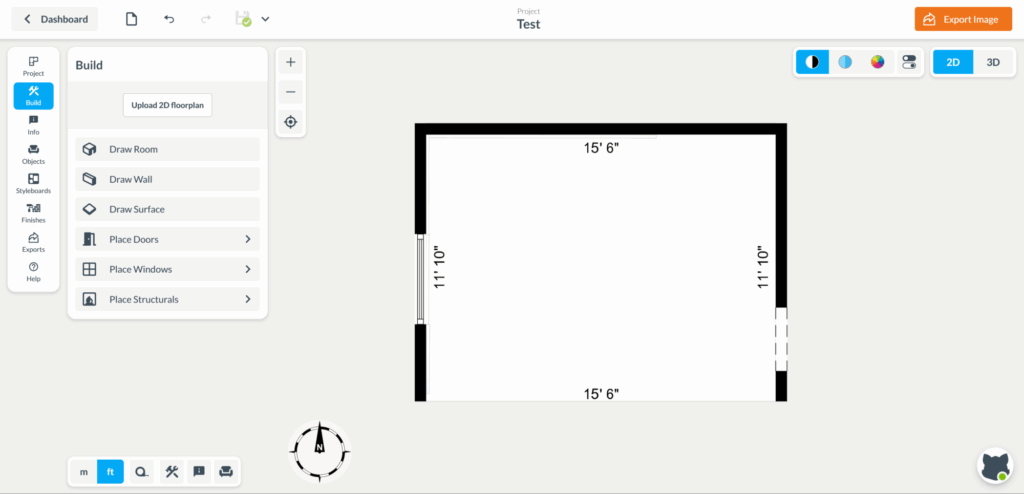
Room creation in Floorplanner with manual wall drafting from a blank workspace—no trace feature, feet-and-inches input, and structural elements added from the built-in library.
Adding and positioning products using Floorplanner
After the room was created, cabinets, appliances, and other foundational elements were added. Floorplanner contains a large library of general 3D items, but it does not provide manufacturer-specific kitchen catalogs. Finding cabinets that matched standard kitchen sizes was difficult, and several items did not allow styling of countertop finishes or materials. Corner base cabinets did not snap to corners, and many products passed through the walls instead of aligning with them. While wall cabinets snapped into place on some surfaces, base cabinets required careful manual adjustment. The platform did not allow users to click on an existing measurement and edit it directly, making precise placement more time-consuming.
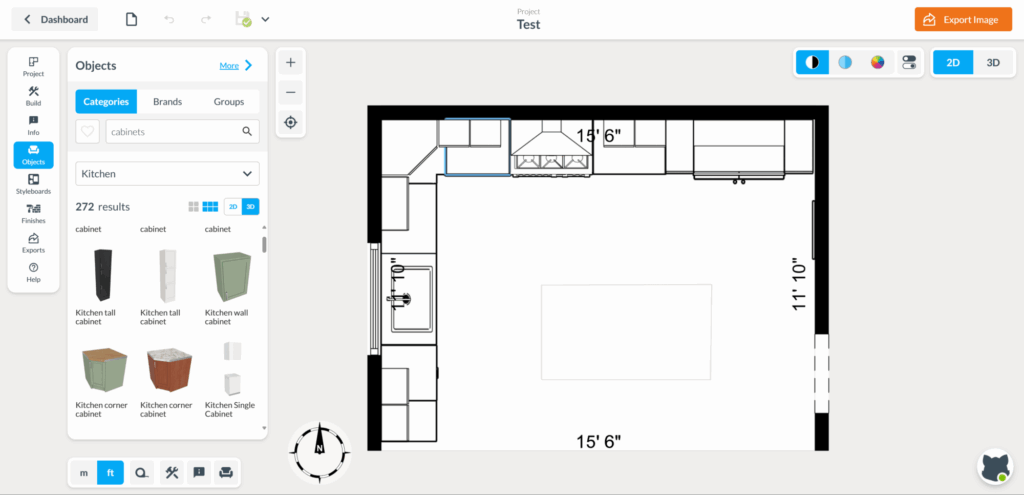
Adding and positioning products in Floorplanner using generic 3D libraries, with limited kitchen-specific options, inconsistent snapping, and manual adjustments for accurate placement.
Customization using Floorplanner
We attempted to apply the same finishes used across all tests. Customization options in Floorplanner were limited, and many cabinets could not be styled to match the door material, finish, or countertop selection. Some required manually placing a separate countertop object, and others had no customization options at all. While the tool allows for creative workarounds by stacking or combining generic shapes, this approach requires more time and skill and does not support product accuracy for retailers or manufacturers.
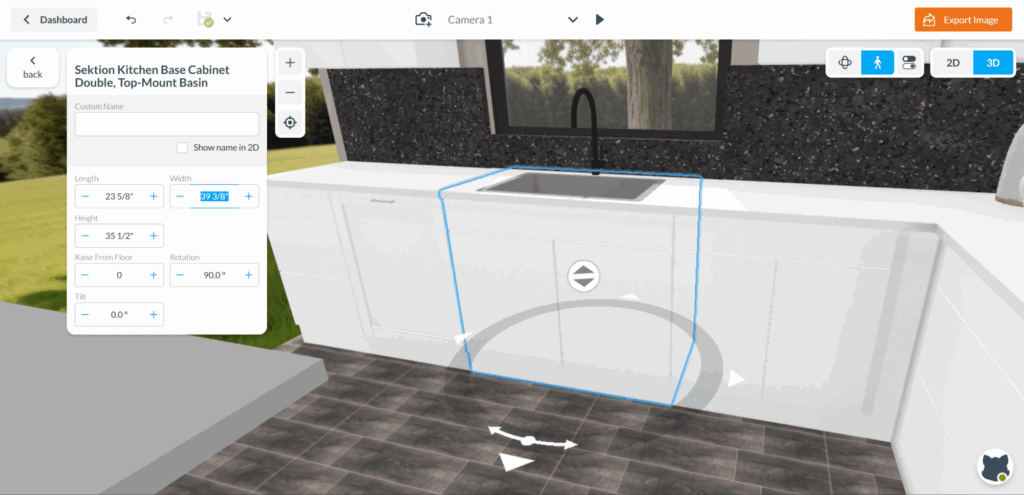
Customizing in Floorplanner with limited styling options, requiring manual workarounds and separate elements to approximate finishes without accurate product representation.
Presentation using Floorplanner
Decoration options were easily accessible due to the large general decor library; however, we were unable to maintain consistency across tests because there were no cabinet manufacturer catalogs available. Image quality was basic, and its effectiveness depended on the complexity of the room. Presentations were simple and better for early design ideas than for final designs or accurate quotes.
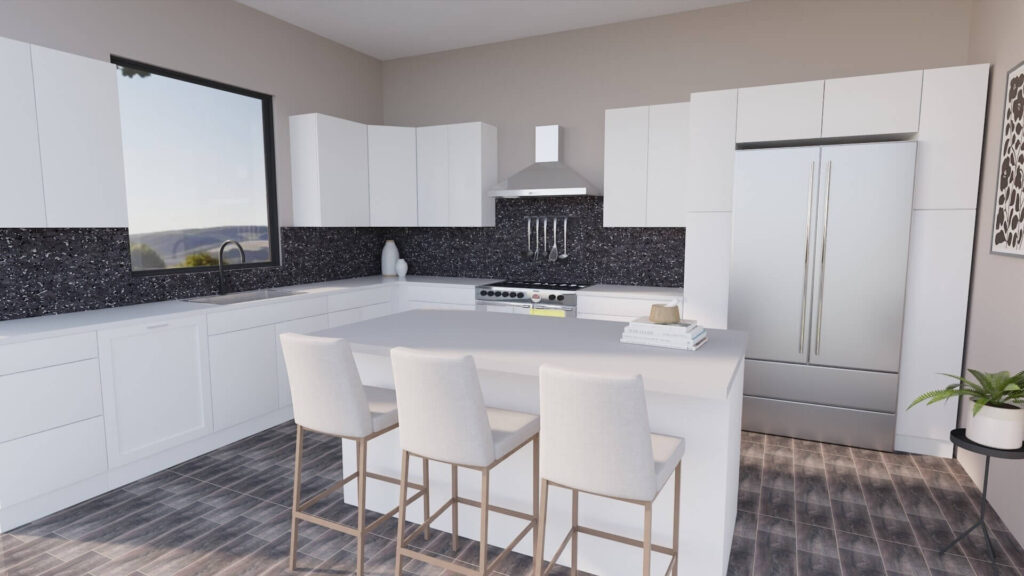
Presenting designs in Floorplanner with easy access to generic decor, basic image quality, and simple outputs best suited for early concepts rather than final, quote-ready visuals.
Final takeaway for Floorplanner
Floorplanner is simple and easy to use, making it great for quick visualizations and basic room ideas. It’s easy to learn, affordable, and quick to set up, so it seems like a good choice for independent designers or small dealers who just need simple 3D layouts. The tool features a comprehensive library of structural and decorative items, and its interface is user-friendly.
However, our testing showed some important limitations for both retailers and manufacturers. Floorplanner does not have any semi-custom or custom cabinet manufacturer catalogs, catalog specific product rules, or mechanisms to ensure products are displayed within manufacturer parameters. Many kitchen features are missing or require creative workarounds to achieve basic kitchen design tasks, which can slow down the process and lead to mistakes.
When it comes to kitchen design, this platform is best suited for early design ideas, rather than detailed designs used in quotes or orders. For businesses that require accurate product details, step-by-step setup, and consistent results both in-store and online, Floorplanner may not be the best choice. It is a quick and easy tool for presenting ideas, but it lacks detailed features required for professional semi-custom or custom kitchen design.
Floorplanner can be a good starting option if you only need basic concept visuals. For any work that needs complex cabinetry catalogs, quotes, product rules, or large-scale use, it should be compared with more specialized tools.
3D kitchen design software review summary
Key Findings
- 3D Cloud: Ideal for enterprise retailers and manufacturers with large product catalogs and the need to scale across multiple catalogs, locations and use cases. The platform offers options for both consumer self-service design and pro kitchen designers. Its intuitive browser-based design, automatic features, training resources, and ability to connect with other systems.
- 2020 Design: For traditional desktop use. Its long history and designer familiarity make it good for businesses that use more long-standing design methods. Performance can be contingent on the machine being used to access the tool.
- Floorplanner: Best for early concepts that only require basic visuals. It is easy to use, low-cost, and suitable for simple layouts and ideas, making it a good choice for regular users. Look elsewhere for design tools that help you to build an accurate quote or ensure accurate design measurements.
Overall assessment of 3D kitchen design software
- The market is moving toward web-based solutions that require less IT support.
- Integration capabilities, such as ERP, shopping cart, order management, and API connectivity, are becoming increasingly important in aligning product accuracy across channels.
- Consumer self-service is quickly emerging as a key differentiator, with retailers seeking tools that support web design, quoting, and features geared toward virtual customer collaboration.
Decision framework by business profile
Choose 3D Cloud if you:
- Are an enterprise retailer or a kitchen cabinet manufacturer.
- Sell ready-to-assemble (RTA), flat-pack, or semi-custom cabinets with numerous finish options and a wide range of products.
- Need omnichannel functionality for both professionals. Strong connections with order management systems or online store platforms are required.
Choose 2020 Design if you:
- Are a single-location shop or an SMB kitchen dealer.
- Sell high-end, custom, or luxury cabinetry that requires deep manual control for designers.
- Prefer installed desktop-based software with local performance.
- Prefer to keep using more traditional systems and processes.
Choose Floorplanner if you:
- Are an independent kitchen designer or a small dealer with basic visualization needs.
- Do not need manufacturer catalogs or detailed product rules.
- Need a tool that works immediately with minimal setup.
- Only need basic 3D images for early design ideas.
3D kitchen design software recommendations by business profile
| Business Profile | Best Choice | Backup Option | Why |
| Enterprise Retailer | 3D Cloud | 2020 Design | Needs scalability, omnichannel tools, API workflows, and consistent catalog accuracy across many stores. |
| Cabinet Manufacturer | 3D Cloud | 2020 Design | Requires configuration management, rule enforcement, and accurate product representation. |
| SMB Kitchen Dealer | 2020 Design | Floorplanner | Familiar desktop workflow; detailed control for high-end or custom cabinetry. |
| Independent Designer | Floorplanner | 2020 Design | Low cost, fast setup, and simple tools for early-stage concepts. |
| DTC / E-Commerce Retailer | 3D Cloud | Floorplanner | Self-service design tools, render capabilities, and shopping cart automation. |
3D kitchen design software recommendations by cabinet type
| Cabinet Type | Best Choice | Backup Option | Why |
| RTA / Flat-Pack | 3D Cloud | Floorplanner | Requires configuration management, assembly instructions, and self-service design. |
| In-Stock (Off the Shelf) | 3D Cloud | Floorplanner | Fast selection from limited SKUs, quick quoting, and inventory integration. |
| Semi-Custom | 3D Cloud | 2020 Design | Balances configurability, visualization, and accuracy. |
| Custom | 2020 Design | 3D Cloud | Maximum flexibility for bespoke cabinetry and detailed specification work. |
Final thoughts on 3D kitchen design software
After comparing these three kitchen design tools, it’s clear that not all 3D design tools are made for the same users. Some are built for the mass market, focusing on simple room sketches or homeowner-driven concepts. Others were created years ago for in-store designers and still use desktop-based workflows. Then there are modern, enterprise-level platforms designed for large retailers and manufacturers that require accuracy, automation, and seamless customer experiences across multiple channels.
Floorplanner fits the first group: it’s simple, low-cost, and focused on visualization. It’s easy to use and quick to set up, but its features are limited. Without support for cabinet manufacturer catalogs, product rules, or advanced configuration, it’s best suited for basic layouts, rather than professional kitchen design.
2020 Design falls into the legacy category. It remains the familiar choice for many long-time designers who have spent years mastering its interface. Yet, its reliance on local installs, manual configuration, and dated workflows makes it harder to scale, slower to deploy, and more prone to interruptions. While capable in expert hands, it does not naturally support cloud-based, interconnected workflows that retailers and manufacturers increasingly expect.
Only 3D Cloud showed the scalability, product accuracy, and omnichannel features that modern retail organizations need. I also learned after testing that many of the most advanced planners used by major retailers are actually powered by 3D Cloud behind the scenes.
That explains why the platform looked so polished: instant images, product rules, real-time catalog updates, VR views, and a fully web-based experience. The platform supports both customers designing on their own and advanced tools for in-house design teams, like camera controls, lighting tools, measurement features, product list creation, and business dashboards.
If you’re a retailer or manufacturer evaluating kitchen design software, the ultimate choice depends on your business model and your future goals. Large enterprise retailers and manufacturers with complex product lines derive the most value from a cloud-native platform, featuring powerful integrations and a single source of truth for catalog management. Small dealers or legacy teams that were already invested in training in 2020 find comfort in sticking with what they know, particularly in highly customized cabinetry. And designers only needing simple visualization may find Floorplanner sufficient.
Consider the following guidance as you explore options that fit your needs:
- Consider your business and how you intend to grow. The right tool for a single shop may not work for a national retail chain.
- Look into software capabilities to support your cabinet offerings. RTA, in-stock, semi-custom, and custom lines each require a different feature set.
- Consider IT support, catalog maintenance, training time, and workflow efficiency.
- Test each platform with your specific use cases; a sample kitchen is often not aligned with your specific catalog and business rule needs.
- Plan ahead with scalability and integration needs in mind. Fully capable tools will need to allow API support, omni-channel experiences, and consumer self-service.
Why many retailers and manufacturers choose 3D Cloud
For kitchen retailers and manufacturers evaluating 3D design software, 3D Cloud stands out as a platform built specifically for modern, high-volume workflows. Unlike legacy desktop tools or basic visualization software, it combines accurate product configuration, automation, and customer-ready presentations in a fully browser-based environment.
3D Cloud Kitchen Designer goes beyond drawing layouts. Built-in product rules prevent invalid cabinet combinations, while automated bills of materials, shopping-cart exports, and API integrations allow designs to move cleanly into quoting, ordering, and manufacturing systems. This reduces manual rework, protects margins, and keeps product data consistent across teams and locations.
The platform also supports how kitchens are sold today. Customers can start designs themselves using embedded self-service planners, then continue with in-store or remote associates without losing accuracy or intent. Instant photorealistic renders, VR panoramas, and shareable design links help teams present confidently and close faster, whether online or in person.
For organizations that need speed, accuracy, and scalability without long training cycles or heavy IT overhead, 3D Cloud offers a purpose-built solution for kitchen retail and manufacturing. It’s designed to support growth, align digital and in-store experiences, and ensure products are specified and sold exactly as intended.