
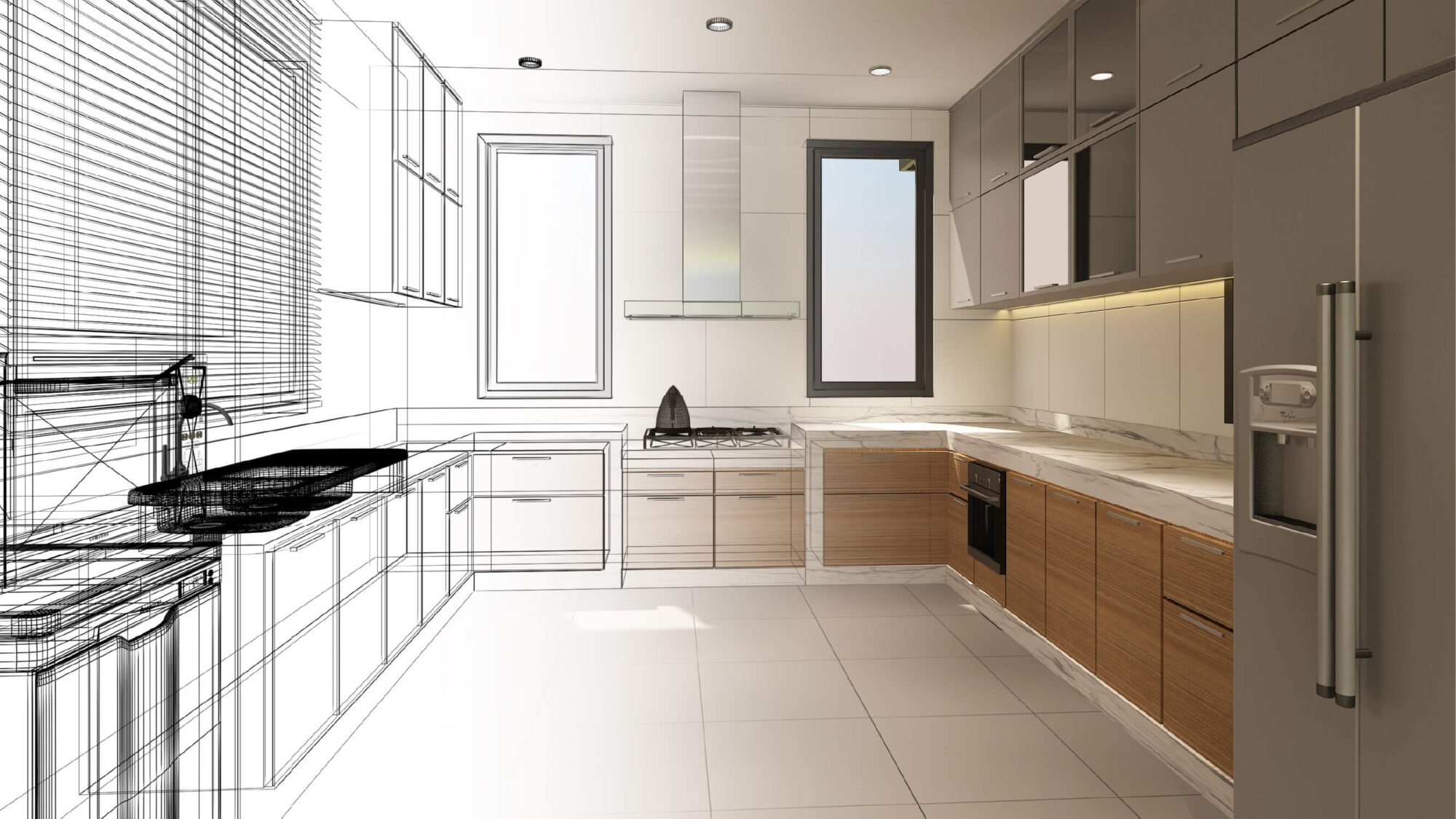
Kitchen planning tools shape how projects move from idea to order — but their true value only becomes clear in the showroom over time. See what happens when measurements are imperfect, budgets shift, revisions pile up, and designs must hold up through ordering and installation.
Inside this article:
- Why kitchen retailers are re-evaluating their 3D design tools
- Kitchen visualizers vs. kitchen planners
- Reducing friction before kitchen design work begins
- Kitchen design revision without rework
Executive summary:
Kitchen retailers are reassessing their use of 3D planning tools as customer expectations rise and projects become more complex. Visualizers help spark ideas, but full kitchen planners must handle real dimensions, product constraints, revisions, and ordering accuracy. Tools that reduce early friction, support fast revisions, enforce manufacturability, and scale across teams help designers work more efficiently while building customer confidence. Choosing the right platform ultimately comes down to how well it performs under real-world constraints, changes, and timelines.
How kitchen planning tools hold up in real retail workflows
Most kitchen retailers and manufacturers already rely on some form of 3D design software. The real question is whether those tools hold up once projects move beyond the screen and into real conversations, real spaces, and real decisions.
At first glance, many planning systems seem interchangeable. They produce layouts, generate visuals, and output drawings. In a short demo, it can be difficult to tell where one ends and another begins. That sense of sameness rarely lasts long once the work begins.
Anyone who has spent time in a kitchen showroom has seen this play out. A customer arrives excited, but without clear answers. Measurements are approximate. Budgets are flexible. The conversation feels productive, yet nothing is fully defined. It’s in that space between interest and clarity where time quietly slips away.
Then the questions start to change. A customer wants to compare cabinet brands. Midway through the discussion, the budget shifts. A visual design needs to become something that can actually be ordered and built. This is often the moment when the limits of a design tool become impossible to ignore.
Drawing on more than a decade of experience in kitchen design, I’m focusing this article not on ideal workflows but on the elements that hold up in practice as projects encounter the realities of the field. Accuracy, constraints, and follow-through matter here. That’s where outcomes are decided.
Why kitchen retailers are re-evaluating their 3D design tools
Customer expectations around planning have changed. According to the 3D Cloud Kitchen & Bath Project Planning Trends Study for 2025, 74% of homeowners say they are more likely to work with a retailer that offers 3D planning tools. That preference reflects a desire for guidance and clarity, not simply access to self-service technology.
Planning is no longer a separate step. It has become part of the buying experience.

Beck Besecker, 3D Cloud’s CEO and Co-Founder
Beck Besecker, CEO and Co-Founder of 3D Cloud, has framed this shift clearly: “3D technology helps retailers erase the lines that separate online and offline experience, providing consistent visuals, virtual interactions, portability, and personalized experiences across touchpoints.”
For retailers and manufacturers, the question is no longer whether 3D tools belong in the process. That decision has largely been made. What matters now is whether the tools in place continue to support the work once real constraints appear and expectations meet reality.
Kitchen visualizers vs. kitchen planners
Kitchen visualizers typically appear at the very beginning of the process, when customers are still getting their bearings. They let people experiment with finishes, colors, and general styles using a fixed image or a simplified scene. The appeal is straightforward. These tools help answer early questions and give homeowners a way to sort through preferences before involving a designer.
Visualizers help customers react to options and narrow down what feels right, but they are not built to manage the full scope of a kitchen project.
Kitchen planners take over once ideas start turning into real decisions. Layouts have to work in actual rooms. Cabinets need to fit the space as it exists, not as it was imagined. Clearances matter. Pricing needs to be understood early. What a customer sees must align with what can actually be ordered and built.
Kitchen planners handle this by working with real dimensions, established configuration rules, and product data that reflects how cabinetry is made. These tools are designed to surface issues early, before they become costly or frustrating.
In short:
- Visualizers help customers get started
- Kitchen planners turn those ideas into designs that can actually move forward
Reducing friction before kitchen design work begins
Before layouts and elevations ever appear, the groundwork for a kitchen project is already being set. Tools that clarify space, budget, and preferences early reduce wasted effort later and help designers start with inputs that reflect real constraints, not assumptions.
Why early clarity matters for kitchen projects
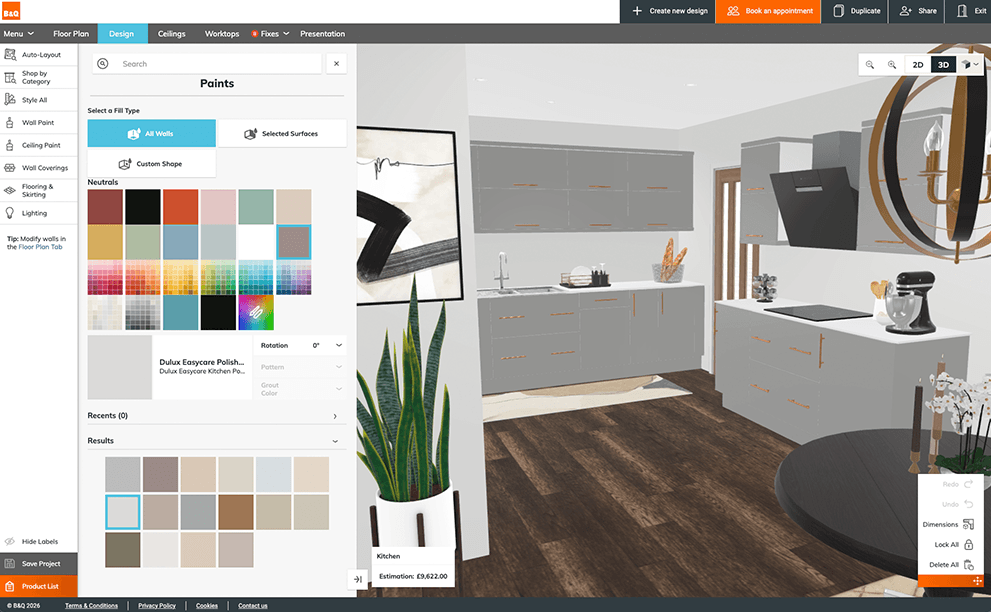
Letting customers explore finish options early gives designers clearer inputs and reduces time spent revisiting preferences later.
Some of the most avoidable delays in a kitchen project happen before any design work officially starts. When early choices are loose or undefined, designers end up spending hours sorting through preferences, revisiting assumptions, and realigning expectations that could have been settled earlier. That time rarely shows up on a timeline, but it affects every step that follows.
Tools that help teams arrive at the design stage with clearer inputs reduce that quiet drag on the process. The work does not disappear, but it becomes more focused.
Getting the kitchen project basics in place early
Style quizzes, estimators, and early visual tools help collect information before a designer ever opens a layout. When that input carries into the design environment, less time is spent asking foundational questions, and more time is spent working through the space itself.
For customers, these early planning tools offer a way to explore options, gauge budget, and respond to visuals before meeting with a designer. This does not replace professional design. It simply means the first conversation starts with more clarity than guesswork.
Starting from a kitchen project space that already makes sense
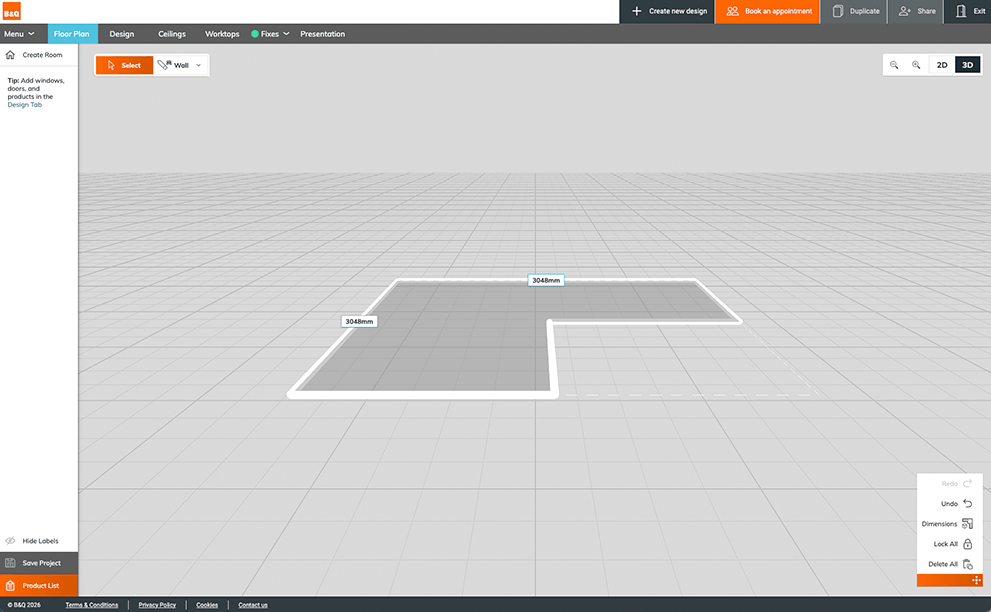
An L-shaped kitchen space drawn in the Room Planner’s floor plan view. Starting from an accurate room layout helps designers move straight into product placement.
The 3D Cloud Room Scanner is one practical example. It uses LiDAR technology (light detection and ranging) to capture a space with roughly one-inch accuracy.
This is not meant to replace final measurements. It is accurate enough, however, to support early feasibility checks and preliminary estimates. That alone can prevent unnecessary backtracking later.
When faster kitchen project preparation changes the conversation
When less time is spent on basic details, conversations shift. The planning process feels more concrete earlier on.
Designers can quickly create accurate 3D kitchen layouts and walk customers through visuals that reflect the items they will actually order. In some cases, this allows someone to walk in without an appointment and leave with a credible plan the same day.
That shift matters. According to the 3D Cloud Kitchen & Bath Project Planning Trends Study 2025, 87% of users say kitchen or bath planning tools are extremely or very helpful when making purchase decisions.
Clear starting points lead to faster conversations and more confident decisions, because fewer unknowns are left hanging.
Kitchen design revision without rework
Design changes are part of almost every kitchen project. A customer wants to compare cabinet brands. A budget changes. A layout that seemed fine at first needs to be reworked. None of this is unusual. What matters is how much time those changes cost once they show up.
In many kitchen planning tools, even small changes can trigger a surprising amount of rework. Designers duplicate projects, rebuild layouts, or adjust dozens of cabinets by hand just to explore a single alternative. Across a team, those hours add up quickly.
This often comes down to how catalogs are handled. In kitchen planning software, a catalog typically represents a specific manufacturer or product line, complete with its own sizing rules, construction logic, and constraints. When tools treat those catalogs as incompatible, switching from one brand to another can mean starting over entirely.
That is where tools such as the 3D Cloud Kitchen Planner’s catalog-swapping feature become important. In systems built around structured product data, designers can change catalogs without losing the work they have already done. Cabinets shift to accommodate different dimensions or construction details, instead of forcing a full rebuild of the layout.
Without this kind of support, even a straightforward change can double the time spent on a project. With it, designers can explore alternatives quickly and move forward without retracing their steps. Over time, that difference has a real impact on both workload and momentum.
Enforcing kitchen project accuracy while keeping teams productive
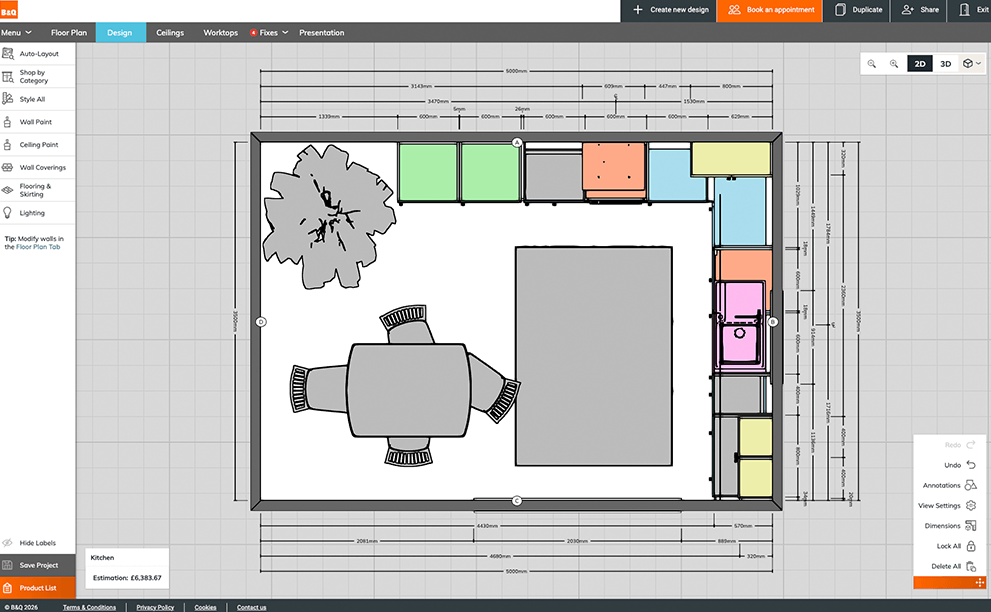
A color-coded 2D layout with dimensions helps designers verify sizing and placement accuracy before a project moves to ordering.
There is a point in every kitchen project where moving fast stops being helpful. Accuracy starts to matter more. If manufacturability is treated as a final check, problems tend to surface late, when they are harder to fix and more expensive to explain.
Some planning tools address this by baking real product limits into the design process itself. Cabinets can be sized only within ranges that are actually manufacturable. Certain combinations are allowed. Others are not. This prevents designs from drifting into solutions that look acceptable on the screen but fall apart once they reach the ordering stage.
When done well, this kind of guidance does not feel restrictive. It acts as a guardrail. Designers are notified when something does not work, often with a brief explanation. Once the issue is corrected, the notice goes away, and the work continues.
This approach also ties directly to customer confidence. The same industry research shows that 76% of remodeling professionals consider 3D previews important to customer satisfaction. That confidence only holds if what is shown remains accurate through ordering and installation. Visuals help customers understand the plan. Accuracy ensures the plan delivers on its commitments.
Kitchen design speed, scale, and everyday efficiency
Some of the changes that matter most in a design tool are easy to overlook. Not because they are small, but because they build slowly. Extra clicks here. A workaround there. A system that feels fine until it gets busy. Over time, those small frictions start to shape how much work a team can realistically complete in a day.
Cloud-based access helps remove much of that friction. Designs are available when and where needed. Teams can follow up from the showroom, from home, or from a job site without worrying about files or which version is current. There is nothing to merge or resend. The work just stays in one place.
Shantel Tempel, Product Owner for Kitchens at 3D Cloud, describes it this way: “3D Cloud’s platform is entirely cloud-based. Sales associates can access clients’ designs from any location, allowing follow-ups from home, showroom or even job sites.”
Kitchen project confidence comes from clarity
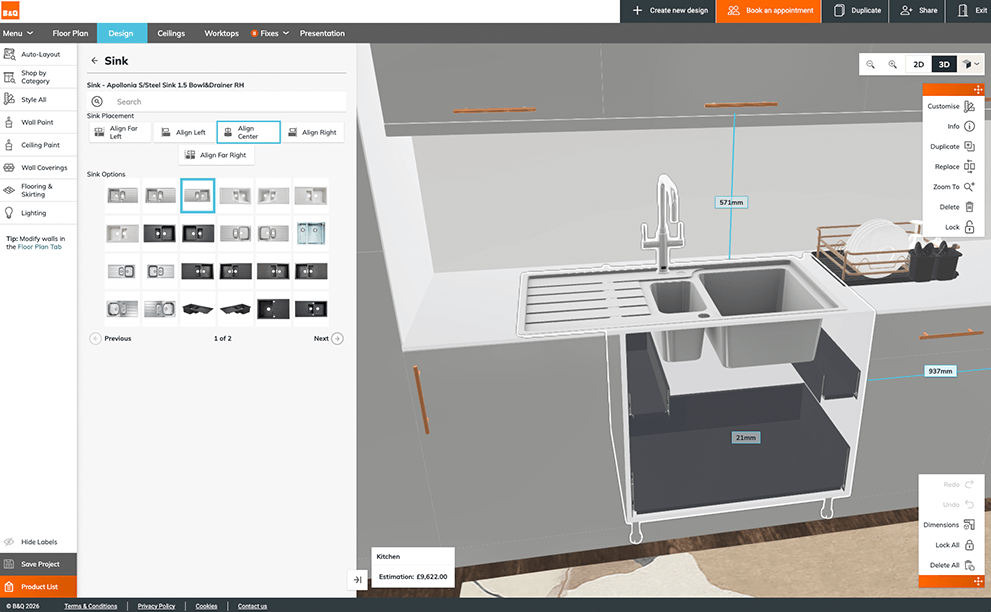
Detailed cabinet configuration in the 3D Cloud Kitchen Planner. Seeing exactly what is included in each cabinet helps customers make decisions with confidence.

Shantel Tempel, Product Owner for Kitchens, 3D Cloud
Confidence does not come from trying to persuade someone. It develops when people understand what they are looking at and what their decisions will lead to. Customers feel more confident earlier when they see clear visuals from the start, understand how their choices affect the outcome, and can make changes within the same design rather than starting over.
That is often when the conversation changes. Instead of hearing, “I should have chosen something else,” designers hear, “Let’s adjust that before we place the order.” The focus shifts from second-guessing to refinement.
This level of clarity is intentional. As Tempel explains, “Designing in 3D shows exactly what the space will look like, allowing the consumer to make complicated and expensive decisions with more confidence and surety that they are getting exactly what they want.”
The same study shows that 80% of users say planning tools reduce remodeling stress. That relief comes from seeing the space clearly, understanding what each decision means, and getting aligned earlier in the process, before uncertainty has time to build.
Kitchen planning tool adoption and change management
Choosing a new kitchen planning tool goes beyond mere technical choices for retailers. It alters the way designers handle their everyday tasks. Impacts vary based on how much experience someone has.
Beginners usually pick up new 3D tools quickly, attracted by the quick pace and clear visuals. Veterans, however, bring routines and workarounds honed over years in prior setups. That doesn’t imply they’re against progress. Instead, they focus on whether the fresh system truly fits the flow of actual design tasks.
Teams embrace the shift more readily once they understand the reasons behind the change and how it will affect their daily habits.

Natalia Gesiorski, 3D Cloud’s Head of Training and Design Strategy
As Natalia Gesiorski, who leads Training & Design Strategy at 3D Cloud, explains: “When teams struggle with new tools, it’s rarely because the software is too complex. It’s usually because the change wasn’t framed around how designers actually work.”
Sessions built around practical situations, rather than generic overviews of functions, let people spot benefits earlier. Such an approach also eases tensions during the introduction phase.
Seasoned pros hold a lot of sway in spreading acceptance through the group. Bring them in from the start. Seek their thoughts. Once their suggestions appear on the platform, they shift from doubters to supporters. Make handling transitions a core element of the rollout strategy, not an afterthought. This way, tools are not only adopted but truly integrated.
Final Thoughts
Plenty of kitchen planning tools can produce a decent layout. Far fewer continue to support the work once a project starts moving, changes come up, and real commitments are on the line. For retailers and manufacturers considering a switch, the real test is not how a tool looks in a demo. It is how well it holds up as projects evolve, teams grow, and decisions carry real consequences. That is usually when the differences become clear.
At some point, most teams realize this isn’t really about features at all. It’s about how often the software gets in the way. That realization usually doesn’t happen during a demo. It happens after a few months of real work.
How 3D Cloud supports real-world kitchen planning
That gap between a polished demo and day-to-day showroom work is exactly where many tools start to break down. 3D Cloud Kitchen Designer is built to support kitchen planning as it actually happens — from early ideas and rough inputs through revisions, ordering constraints, and final layouts.
Trusted by leading retailers such as Lowe’s Home Improvement, the platform helps designers move faster without sacrificing accuracy, even as projects change. Features like photorealistic renders make it easier to turn early conversations into workable plans, while cloud-based access keeps designs moving across teams and locations.
Request a demo to see how 3D Cloud supports kitchen planning beyond the demo.