

I’m bringing my 20 years of experience testing digital home products and AI prompting chops to this roundup of AI room planners. I took a close look at the four top LLMs and the most popular AI interior design tools to see just how well they can plan a living room. One thing is clear: They all had similar ideas, but some AI room planners had a harder time following instructions than others.
How we tested
We tested the free versions of the LLMs using Google Chrome on an Apple MacBook Air running macOS Tahoe 26.3.1. These images required a bit of processing power, so the free versions limited the number of images we could create in a day. Our testing occurred over a few days for each LLM.
To test each of the four LLMs, we created a prompt that would provide an image and an overlay of a living room, including the room and furniture dimensions. Once we had a room, we changed the light. We also requested a list of the products highlighted in the room, as many B2C 3D room planners let you buy the furniture that’s moved around in the 3D plan. If the LLM prompted us with more things it could do with the initial information, we allowed it to execute a couple of them.
While our prompt may seem a bit long, we wanted to provide detailed instructions. We tried numerous variations of the prompt, removing some tasks and refining them as we went along. In our test, adding the last request for the list of products highlighted in the image was a task where the LLMs differentiated themselves.
Here’s our prompt:
Create a photorealistic image with a transparent, overlaid technical drawing of a modern, minimalist living room overlooking the ocean. The vibe of the room should be sophisticated comfort. The room measures 12′ x 18′ with a 10’ high ceiling, and one U.S. double-hung window in the center of the north wall, 48 inches wide and 72 inches tall, overlooks the beach. The room should include a seating area that promotes conversation, a large tv, and a bookcase. Include dark wood flooring, a tuxedo sofa, a round glass coffee table, and plants. Follow the 70/20/10 rule for the color scheme: warm neutrals with moody jewel tones, and the 2/3’s rule, where the accent rug is two-thirds the size of the conversation area. Include recessed lighting and one floor lamp. Golden hour lighting. The image should be shot with a wide-angle lens at eye level, looking like an architectural magazine editorial, and zoomed out to show all the details in the living room. Blend the technical blueprint lines seamlessly with the real 3D render, maintaining precise measurements, furniture measurements, annotations, arrows, and small text labels. The overall effect should look like a futuristic AR technical overlay-clean, bright, professional, and highly detailed. Provide a list with hyperlinks of the furniture, accessories, and paint colors featured in the image.
In addition to requesting a room plan, we uploaded an image of a living room and asked it to rearrange the floor plan to make it more engaging and have a more designer look and feel.
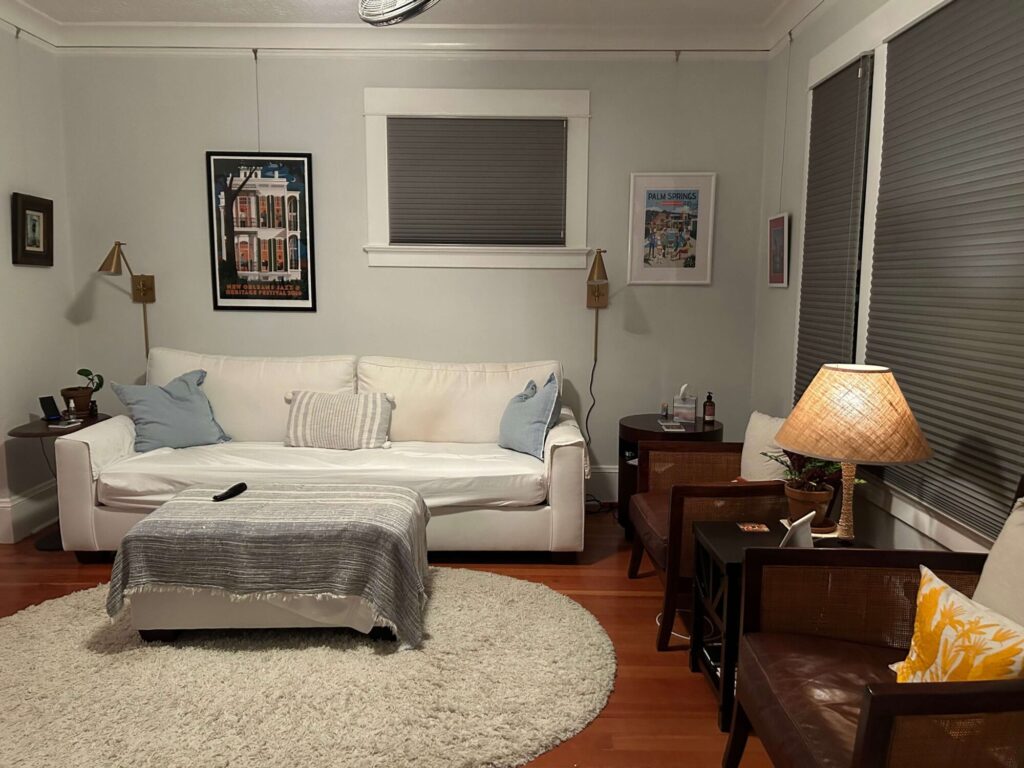
We uploaded this living room photo and used it to test AI room planners.
We provided a basic prompt:
You’re an interior designer, and your client wants to update the room’s layout to make it more inviting and sophisticated. What would you do?
Depending on what the LLM presented, we followed up with requests like this:
Can you create a visualization of the space that applies all the suggestions you made?
Overall, the LLMs did a solid job of creating a room plan that could at least serve as a starting point for designing a room.
CoPilot AI room planner
Microsoft CoPilot knew how to follow directions and provided some interesting layout alternatives. It also did a solid job of recommending next steps that it could help with in the design process. It fell short of providing successful links, but we could find the recommendations when we performed a separate search.
Pros:
Solid furniture placement
Created charts with furniture/accessory links
Cons:
Broken links
How long it took to complete the task: 1 minute, 16.84 seconds
Planning a living room with CoPilot
With CoPilot, you can choose from Smart, Think Deeper, Study and Learn, or Search modes. We made our requests in Smart mode. Similar to ChatGPT, CoPilot also created a recessed bookcase in the same area of the room. Of all the room designs, it did the best with furniture placement, creating a conversation area while still providing a comfortable way to watch TV. As requested, CoPilot listed product links at specific stores and even laid them out in a chart. Unfortunately, as can be the case with AI, the links led to pages where the product no longer existed.
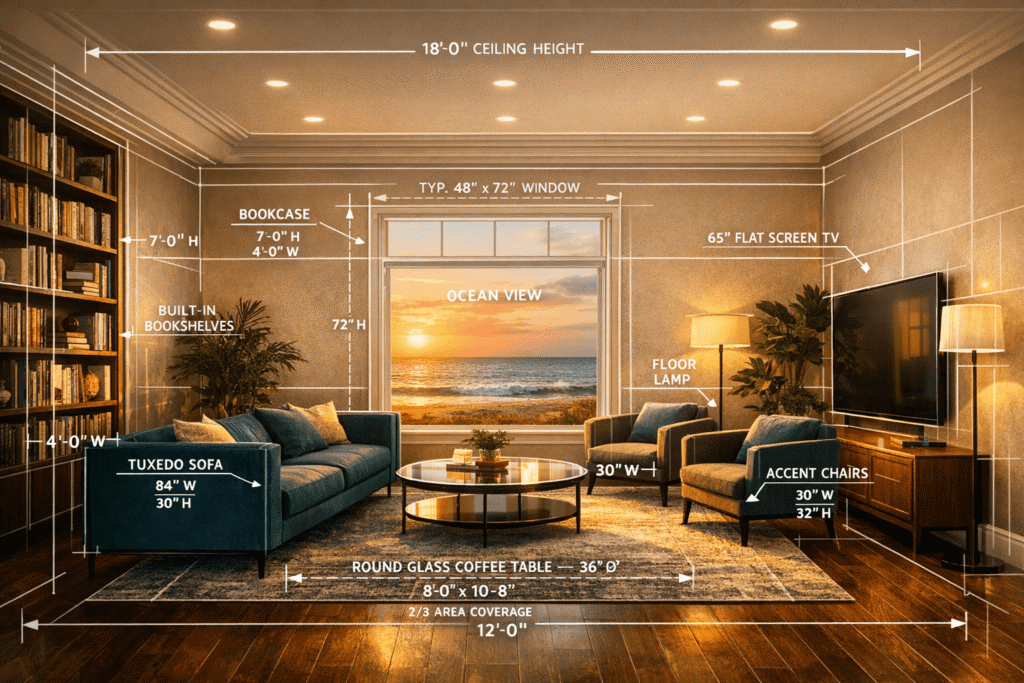
CoPilot transformed our living room photo into this ocean-view room rendering with dimensions.
CoPilot offered to create a floor plan, materials board, shopping list by budget, and a version of the room in a different style. We opted for the shopping list, alternate design style, and a floor plan. The result was a separate page with all the requested information, except for an image of the room in a Scandinavian style, which we asked for, and CoPilot obliged. The floor plan was not a diagram, but rather a list of instructions.
The list of goods by budget tier included some solid recommendations: premium items from Room & Board and Design Within Reach; midrange choices from RugsUSA and Article; and budget picks from Ikea and Target. All picks had prices and product names, but no links. That said, it was easy enough to do a quick search by product name.

The CoPilot renderings were one of the few that delivered on creating a conversation-friendly layout.
When we asked it to reimagine the living room, it generated a layout similar to the previous image. So we started a new chat to see what CoPilot could do. There were similar suggestions to those of the other AI tools, such as updating the lighting, color palette, and art, and slightly angling the chairs. It didn’t automatically create an image of the room. Instead, it asked if I wanted a revised layout, a mood board, or a different style direction. We opted for the sketch and the mood board.
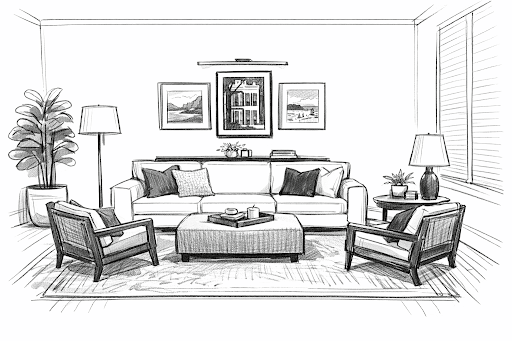
CoPilot asked if we wanted a redesigned living room sketch and produced this one.
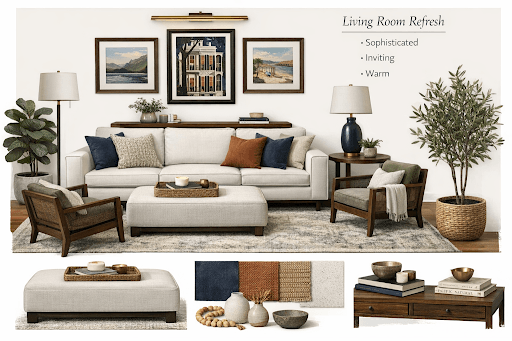
In case we didn’t know how to decorate, CoPilot also generated this mood board.
Nano Banana 2 as an AI room planner
Nano Banana 2 is Google Gemini’s AI image generator and photo editor. It can also do a whole lot more than create room plans, including editing video. In our tests, Nano Banana was the fastest to deliver images and produced a decent-looking room, including the elements we requested and a few things we didn’t ask for that would require a contractor to make happen in the real world. The design advice was adequate, but nothing that blew us away.
Pros:
Completed rendering and shopping list quickly
Followed most instructions
Cons:
The links were hit or miss
Added two windows
How long it took to complete the task: 24.68 seconds using Fast / 42.73 seconds using Pro
Nano Banana 2 AI room plan
When creating images in Nano Banana 2 LLM, it automatically uses the Pro model by default for the first two images. You can also choose Fast or Thinking modes. We didn’t see much difference in the final output, though Pro did look a bit more polished. Each image was also accompanied by a project summary and a hyperlinked list of the room’s design elements.
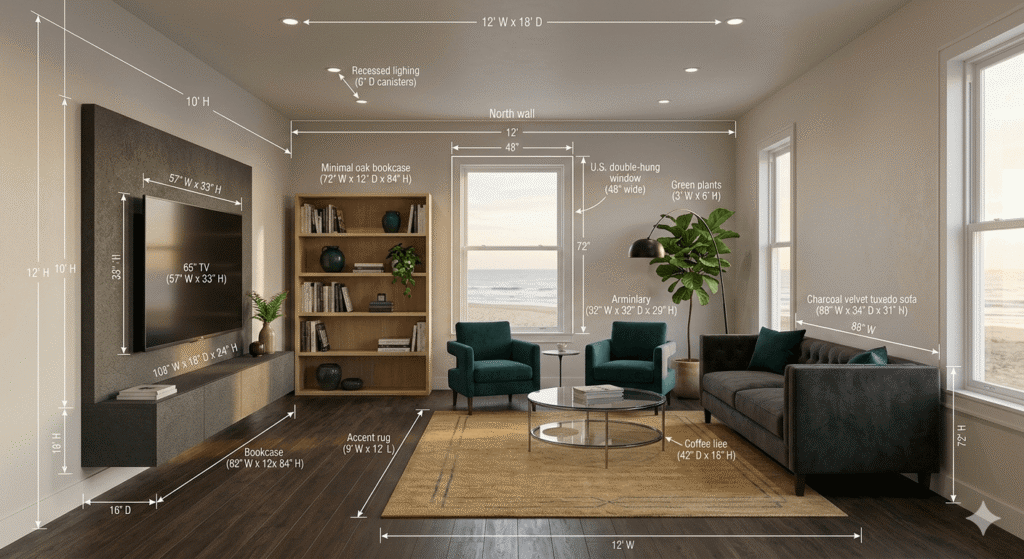
Gemini’s Nano Banana 2 created this living room rendering from our prompt and let some more light in the room.
Overall, the rendering is what we asked for in our prompt; it added two windows to the room that weren’t included in the design. The list of items in the room included the sofa, rug, coffee table, floor lamp, floor finish, ceiling, and wall paint. It didn’t include the chairs, bookcase, side table, TV, or TV stand. Additionally, product links took us to individual Google search results pages rather than the specific product.
We wanted to see if anything would change if we ran the request again using a shorter prompt that eliminated the requests for the AR overlays, transparent technical drawings, and changed the lighting to mid-morning. We also told Nanao Banana that it was an interior designer. It changed the output a little by creating a much more designer-friendly layout. The resulting image also ditched the two additional windows in favor of a large screen door and still provided the dimensions and links to the armchairs, bookcase, and TV stand.
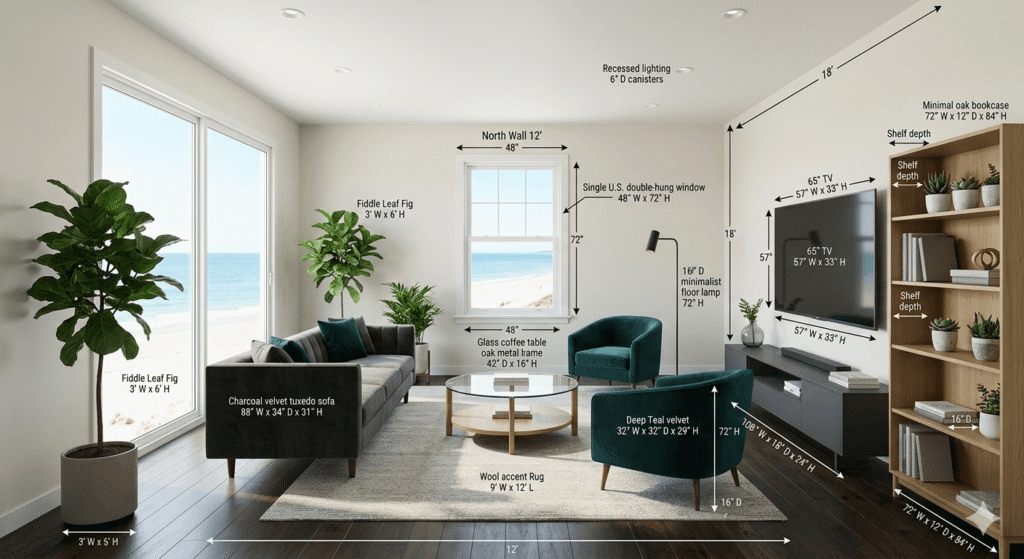
Responding to follow-up prompts, Nano Banana 2 produced this new rendering of our living room, adding even more light.
The free version includes 50 AI daily credits shared across Flow and Whisk. The number of images you can get for those credits varies depending on the request. Once those images were complete, we wouldn’t be able to use the model again for about 3.5 hours. For each result generated.
Next, we uploaded an existing living room to see how it might zhuzh it up. Nano Banana had minimal suggestions, such as updating the frames and paint, and adding some rugs and plants. The big suggestion was to create a conversation nook with the two chairs. The visualization didn’t really apply many of the suggestions.
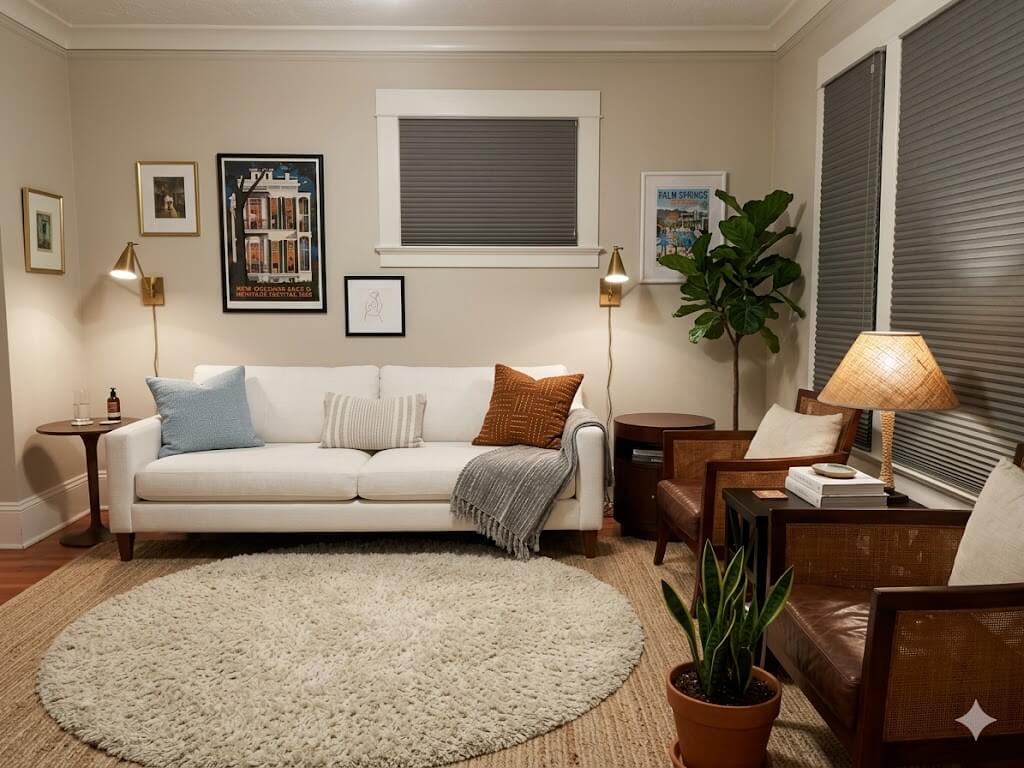
Nano Banana produced this rendering from our living room photo.
When we asked it to apply the changes, it provided an image that was much more polished and designer-inspired.
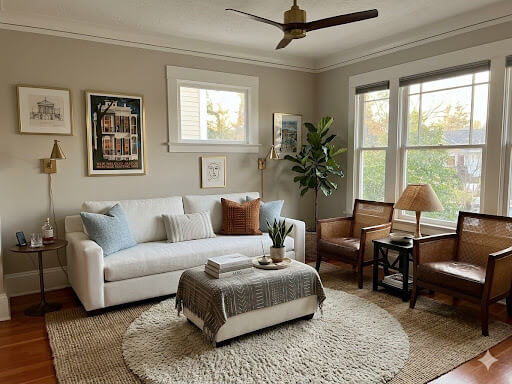
Nano Banana didn’t change too much when it rendered a more sophisticated image with our requested changes.
ChatGPT living room planner
OpenAI’s ChatGPT may be one of the friendlier LLMs, but we wouldn’t say room designing is its specialty. We appreciated that it followed the room layout instructions and didn’t add an extra window. However, it did create a recessed bookcase and designed a room that would make it a bit challenging to watch the very large TV. The redesign of the existing living room was a little stale.
Pros:
Additional prompts from ChatGPT provided a richer experience.
Cons:
Doesn’t follow all instructions
Room layout was lackluster
How long it took to complete the task: 1 minute, 13.53 seconds
Planning a room with ChatGPT
We reached the image creation limit of 4 in the free version of ChatGPT and had to wait 24 hours to create more. The first image didn’t create much conversation space, and it placed two chairs side by side under the TV.
It also didn’t provide the list of items in the room as our original prompt requested. So we asked for the list again and received product details for the furniture in the room, with links that opened in ChatGPT and displayed multiple shopping and pricing options. There were no links to accessories or styling items, just places where we might find similar goods. Paint choices were listed as popular interior paint matches that would require additional searches to find.
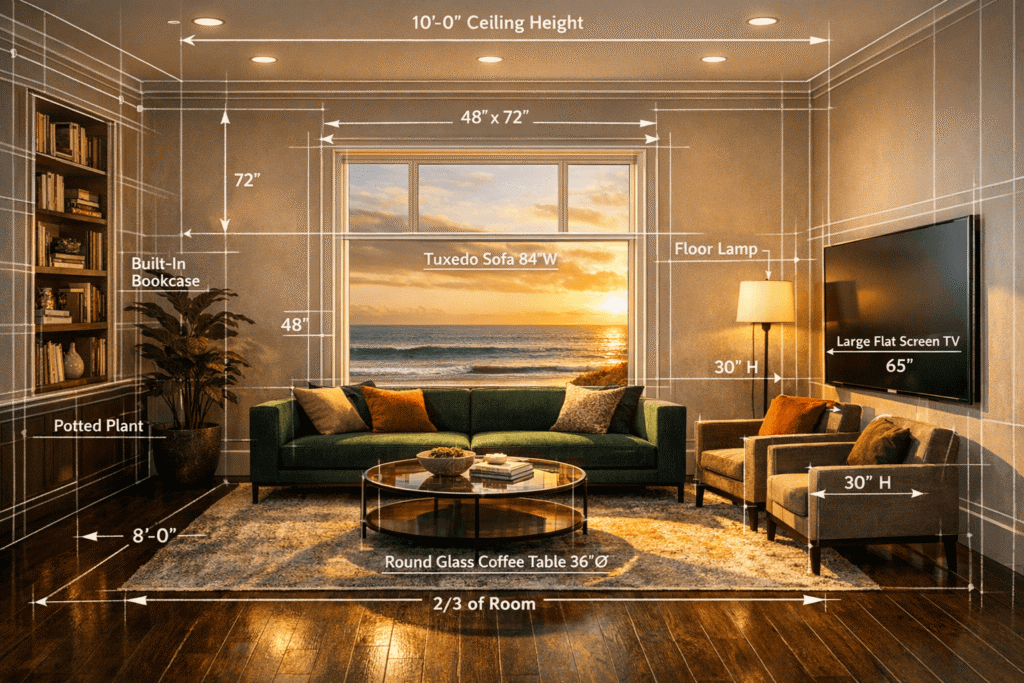
The schematic living room rendering ChatGPT created didn’t offer a lot of options for viewing the TV.
We prompted it to change the lighting and make it easier for people to watch TV. The result? It still kept the chairs under the TV, but the image was brighter. Oh yeah, and there was no furniture in the room that provided a view of the 65-inch TV.
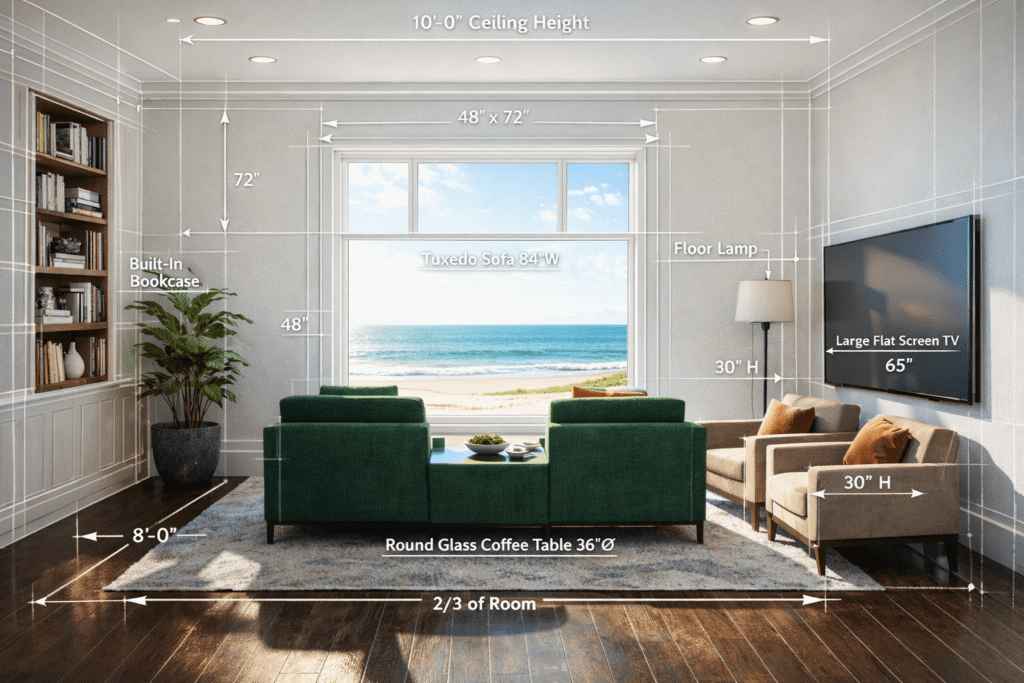
ChatGPT didn’t quite follow our request to make it easier to watch TV with this rendering.
It also provided an approximate layout used in the image above that was technically correct, but its output was not. In the picture, you can see that the sofa doesn’t face the TV, and the two lounge chairs aren’t angled toward it. Additionally, the TV was mounted above the seating instead of opposite it.
ChatGPT provided additional things it could do, such as creating a mood board, a scaled furniture layout diagram, or another photorealistic image. We requested the scaled furniture layout diagram for the room.
The coffee table in the scaled furniture layout doesn’t look to fit on the rug. From the diagram, it appears the coffee table could fit, and ChatGPT provided some spacing tips designers like to use.
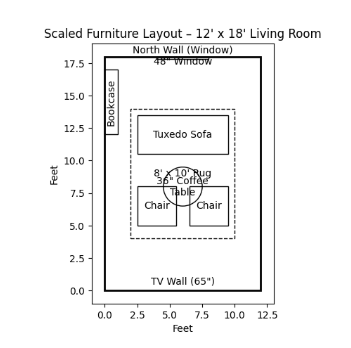
ChatGPT’s scaled schematic of the layout doesn’t quite line up well.
When it came to redesigning an existing room, ChatGPT had a lot of ideas and offered a layout vision. Implementing the changes (float the sofa off the window wall, move chairs to face the sofa, and center everything on the rug) would make the room feel “warmer, designer-styled, more conversational, and more balanced.” However, when it provided a visual of the room, it didn’t change the furniture layout as suggested. But it didn’t offer to put the visualization into a magazine-style mockup. So that’s fun!
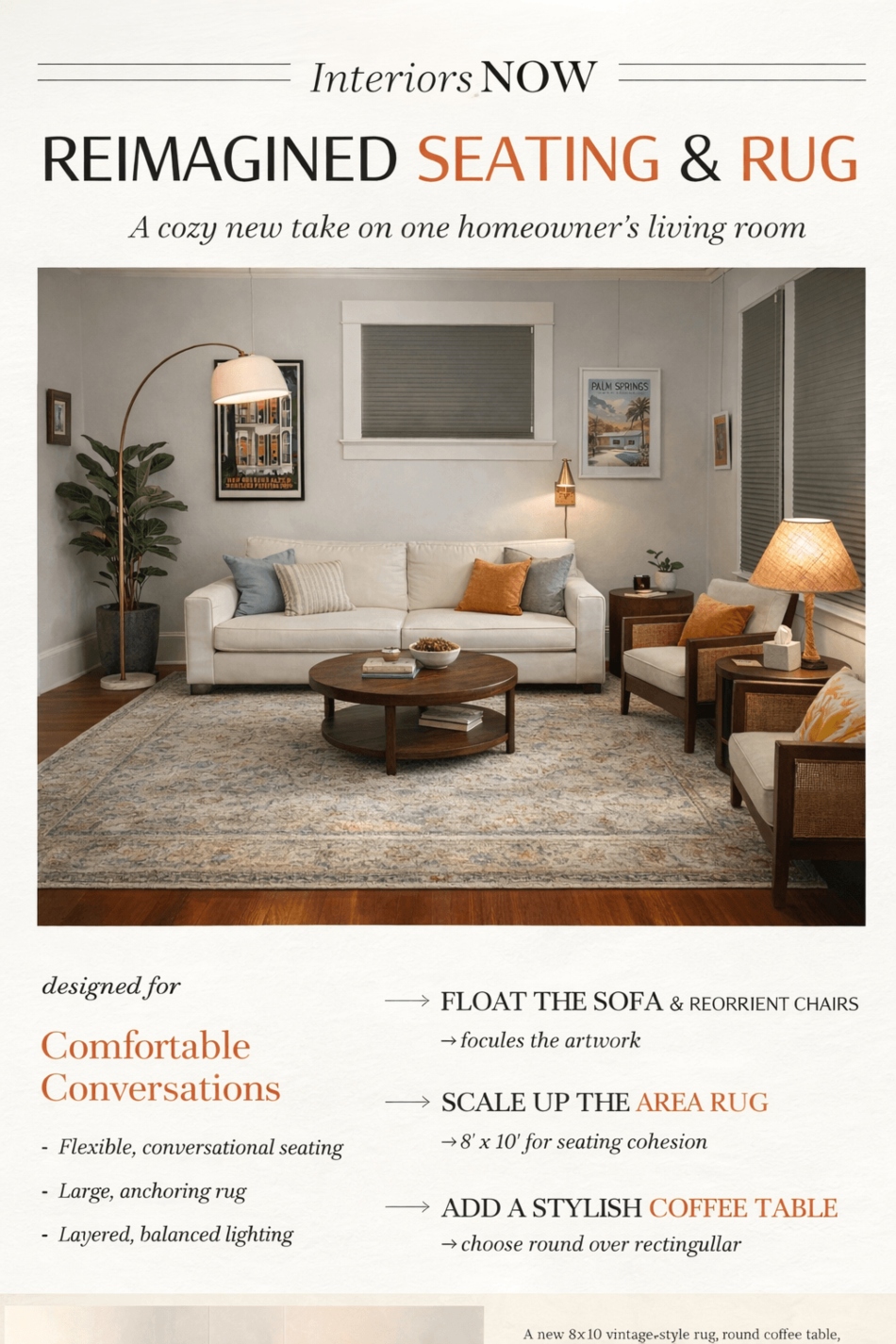
ChatGPT generated this magazine-style rendering of our living room.
Claude AI room planner
Anthropic’s Claude took a different approach to creating a room plan, mainly because it can’t create images. What it did make was quite interesting and was a downloadable HTML file, complete with all the links for the furniture recs.
Pros:
Creates a downloadable HTML file
Provided links to stores and generic item names
Cons:
Created a confusing render
Room furniture placement was a bit off
How long it took to complete the task: 5 minutes, 0.64 seconds
Creating an AI room plan with code and text-based Claude
We used Sonnet 4.6 in Claude to build a room plan. Claude quickly explained that it would start with a rich interactive HTML artifact and then build the AR technical overlay visualization. We watched it write the code to build a blueprint in the AR Design Studio. Next came links to furniture, accessories, and paint colors. It’s an interesting diagram, but a bit hard to visualize how the room plan would come to life. We were able to easily download the image as an HTML file, so all the links still worked.
Speaking of links, the furniture and accessory suggestions went to a particular store. For example, West Elm was the store recommended to find a “Walnut Media Console 72.” The link was to the West Elm homepage, and from there we searched for the item, resulting in a fairly short list of consoles that would fit in the space.
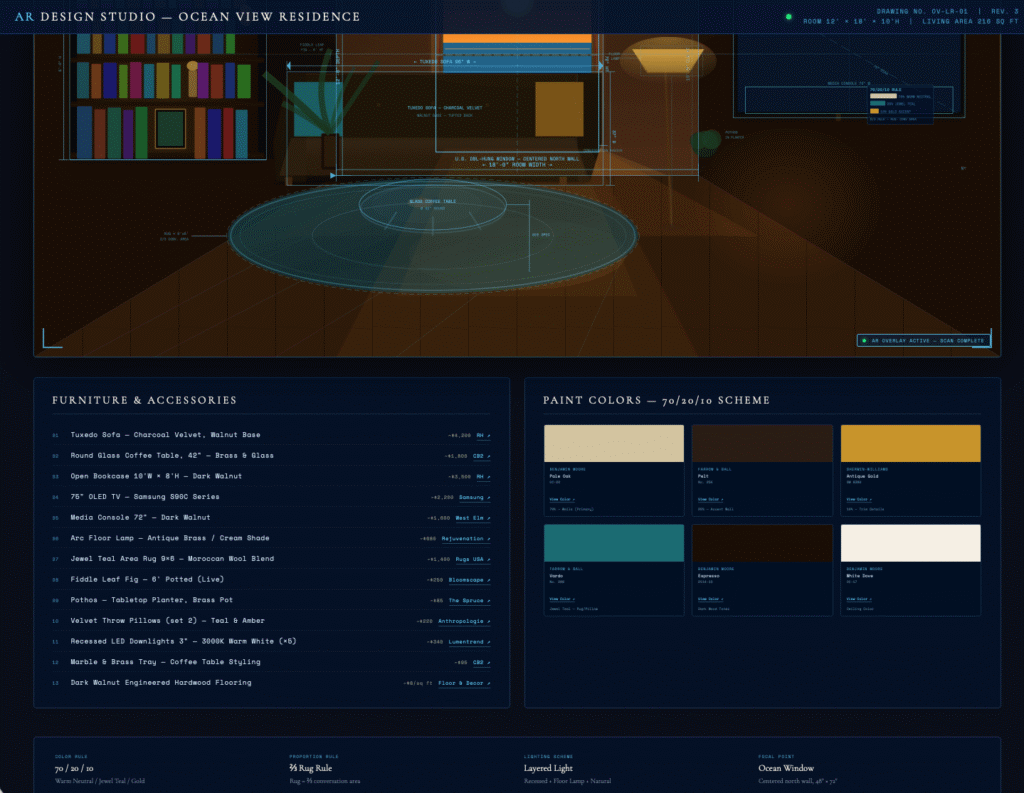
Code-based Claude gave us an interactive HTML artifact that we downloaded as this image for our living room.
Claude didn’t prompt us to do anything else, but we wanted to see if it could produce a realistic photo of the design, as the other LLMs had. Of course, since Claude is text and code-based AI, it can’t really create images, but it did provide other AI tools to try (none listed in this roundup). Instead, we asked it to create a diagram of the furniture placed in the room plan. The proportions and furniture placements don’t look right, but it does give us a better idea of the room layout.
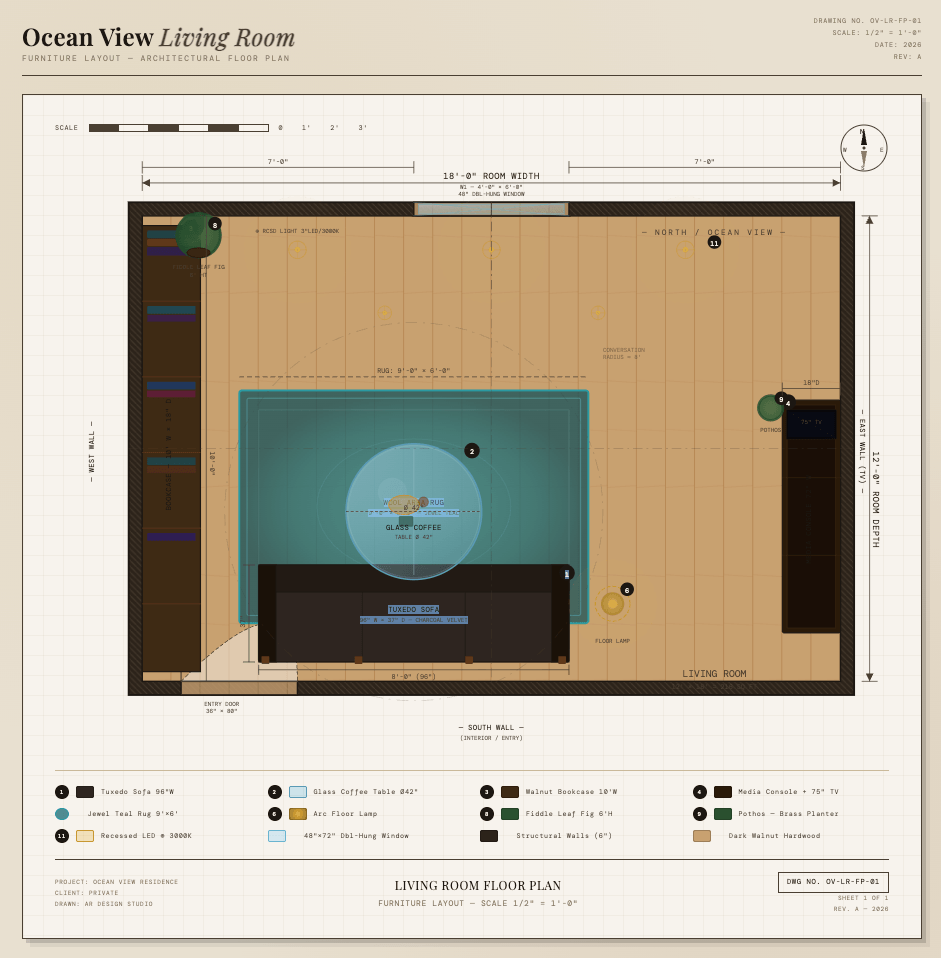
Claude was able to produce code for this somewhat clearer living room diagram upon further prompting.
When we asked for design tips for the existing room, it offered suggestions similar to those of the other AI tools. It’s the only one that mentioned there was no TV in the room and that another wall must be available to place it on. And, in fact, there is another wall with a TV on it in this real-world living room. Claude asked if we wanted to see a floor plan diagram of the new room layout.
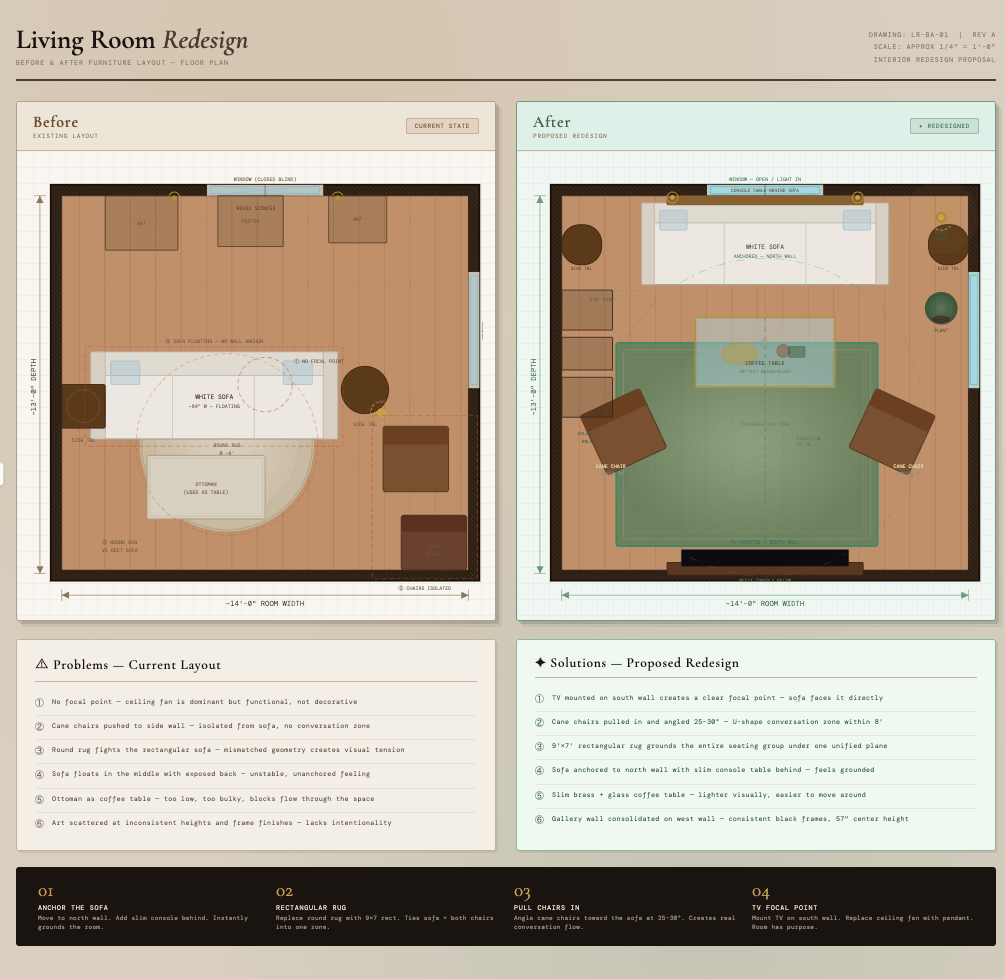
These living room diagrams were the best we could get from Claude.
Better, but still challenging to visualize.
8 popular AI interior design room planner tools
In addition to using an LLM to plan a room, professionals and consumers have a variety of AI room-planning tools available for free or with free trials. Many offer preset prompts to get the design juices flowing. You can also customize prompts and add your own. Some of these tools are more robust than others, such as Spacely and Luw.AI. Others, like Reimagine Home and Palazzo, are more of a shopping buddy, offering suggestions for goods to put in the room you’re reimagining that you can easily buy.
HomeVisualizer.AI
The HomeVisualizer.AI app is for interior designers, architects, real estate agents, and consumers who want to reimagine a space. You can create three free renderings, but then you’ll need to pick between the standard, pro, and business plans. Simply upload the room you want to transform and create a custom design request. Let it blend your room with an inspirational image, change the paint, upscale it, or transform it into another style.
We tried the AI prompt we used for the LLMs. It showed us something quite different from the LLMs. Once you have an image you can edit, enhance quality, download, delete, and even find products, which opens a search page with visual matches. The only thing those matches have in common with the rendered image is that they’re living rooms.
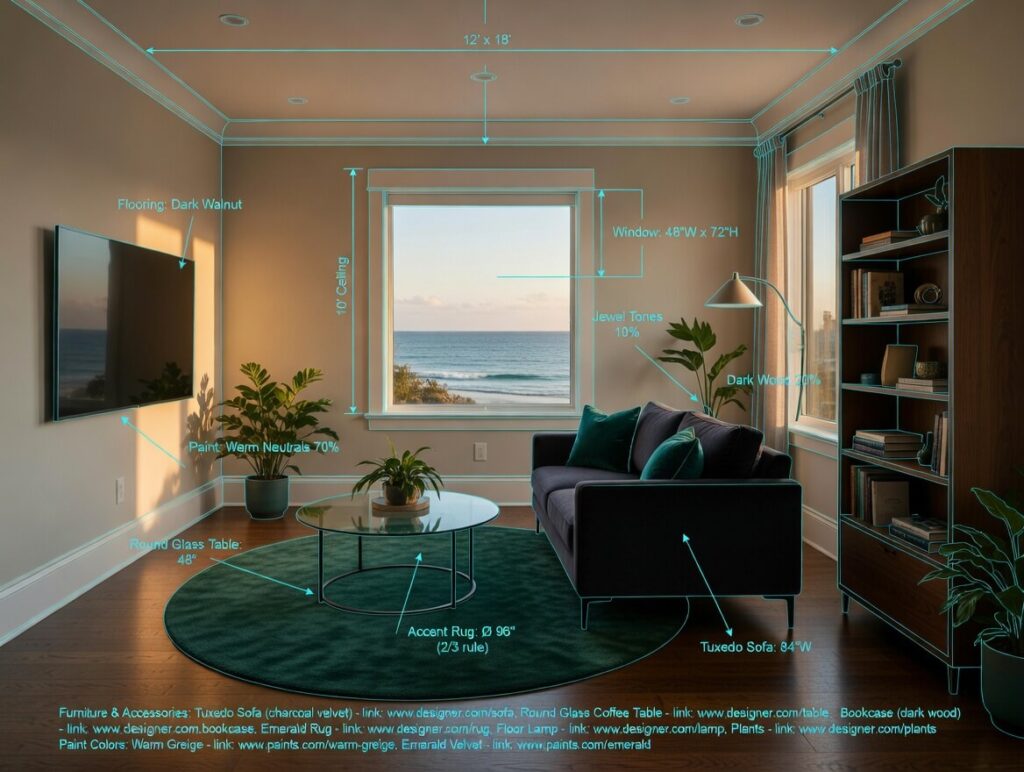
HomeVisualizer.ai created this living room rendering from our testing prompt and was one of the few in this category of AI room planners to provide a schematic overlay.
VisualGPT
Visual GPT is a straightforward, free AI room planner with many features. Once you sign in, you get 10 free credits a day. There are plenty of ways to use them and various AI models to choose from. You’ll find AI-generated videos, visuals, and a photo studio, along with options for creating kitchen plans, exteriors, landscapes, gardens, offices, and more. You can update the style based on a theme or AI prompt, and in this case, we tried something different: Mediterranean. The result helped us envision a completely new look.

VisualGPT created this lovely Mediterranean-style rendering for our living room.
Luw.ai
Luw.ai is a bit more robust in the things it can do. In addition to reimagining interiors and exteriors, it also tackles landscape. Once you upload an image, Luw.ai can create sketches, remove furniture, mood boards, 3D spaces with AI, and much more. It works similarly to the other tools in this roundup. We uploaded the living room and selected Magic Prompt AI to see what it could do. The result was different from other makeovers we’ve seen in the roundup. Most noteworthy, it moved a window and added a wall.
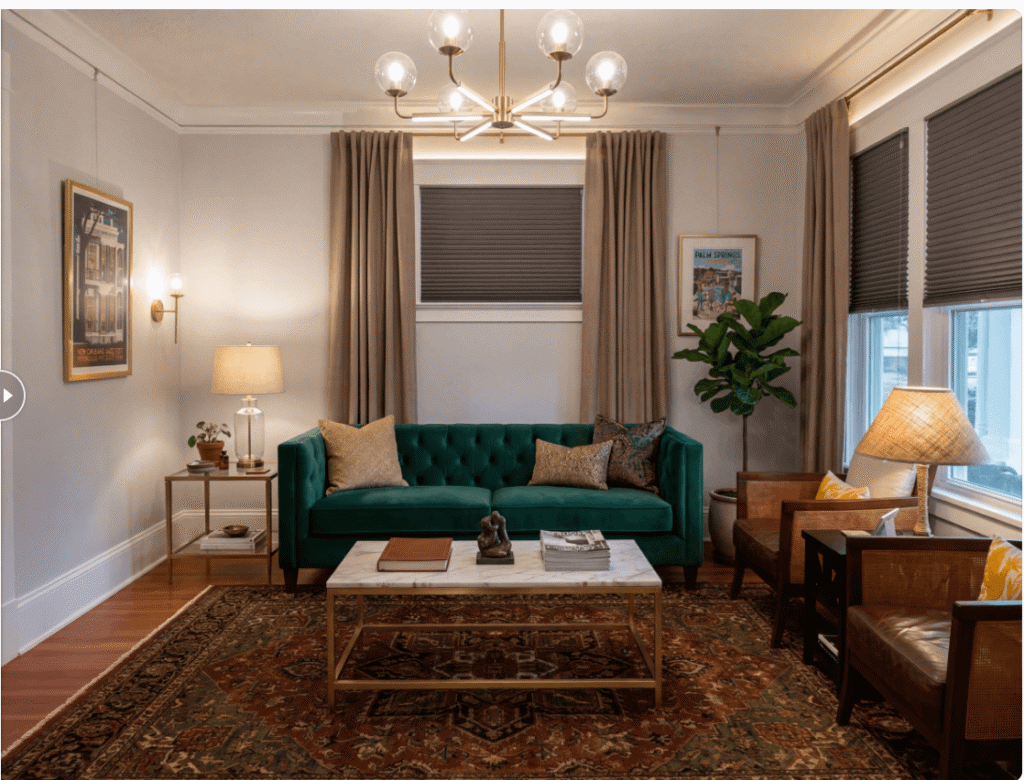
Luw.ai added a wall to render this version of our living room with its Magic AI feature.
Reimagine Home
ReimagineHome.ai is another shopping-room-planner tool. With this one, you can set a budget, lock the room structure in place, and turn moodboards into rooms. We used one of the three free generations to update the living room. Once we uploaded the living room image, we set a budget, added our zip code (to see if items are available in our area), told it to keep the couch and room structure, and waited for magic to happen.
The tool followed instructions well and provided a list of products in our budget to update the space. We didn’t like some, so we opted to swap them for other selections. We clicked Visualize swapped collection button, and voila’, just like that, our three-design free trial ended. But we did get an idea of what the space could look like, and that we could indeed purchase any furniture or accessory suggestions.
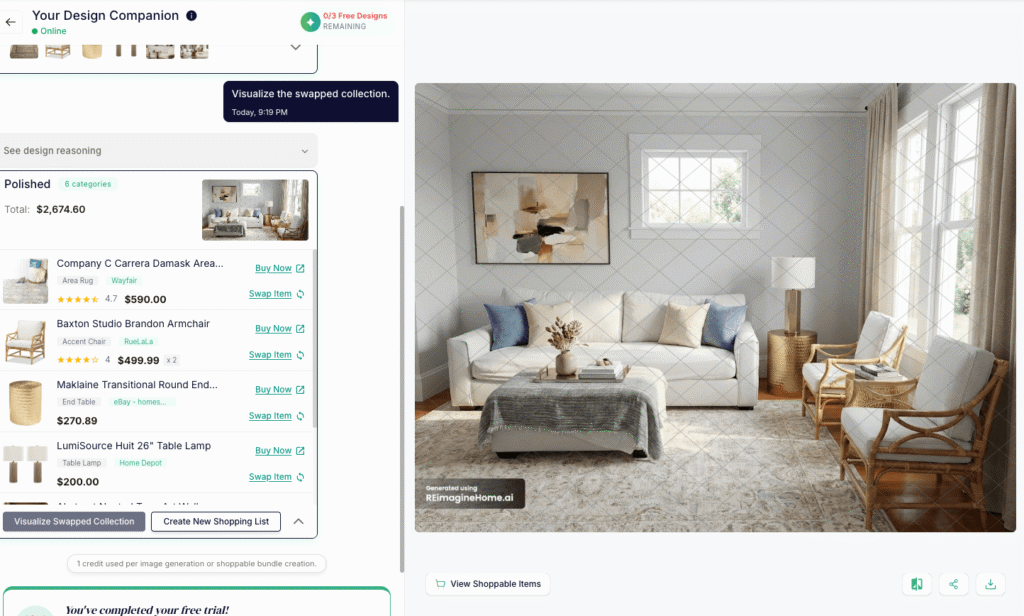
ReimagineHome.ai provides options for buying the furniture in the living room rendering.
Spacely
Spacely is a more advanced rendering tool for architects and interior designers who want to easily bring their ideas to life. The tool also offers an option for realtors who want to render images of existing rooms to show potential buyers what the space could look like. In this scenario, you pick a room and style, and the tool completes the AI prompt for you. Of course, you can modify or create your own.
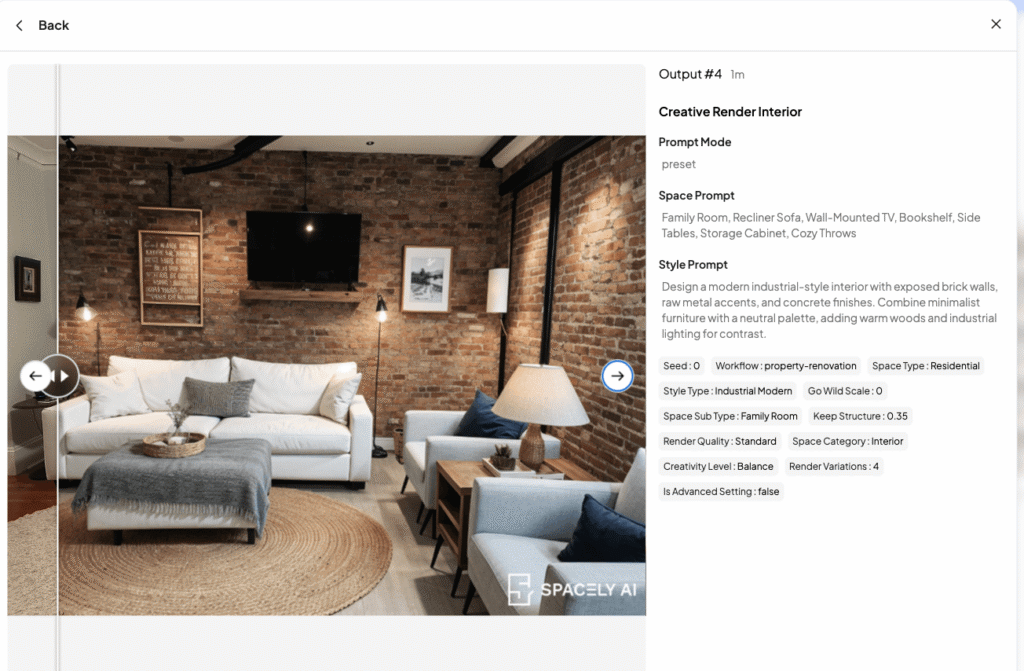
Spacely, a more advanced rendering tool for architects and interior designers, did this version using predetermined prompts.
Palazzo
Palazzo is a room planner AI tool that basically strips all the furniture out of the room and starts to repopulate it with new items you can purchase. There’s a list of products listed along the bottom of the rendering space that you can place in the virtual room. Once you upload an image of the space, the tool will reimagine the space, swap the furniture, or design around a particular object in the room. Pick from one of the nine styles (all with example images).
We opted for the modern farmhouse design called Mane + Mason. The first rendering was meh, but there’s an AI chat box you can interact with to make changes to the plan. Prefer a previous version better? No problem, go to the chat history and select the image you liked best. After a bunch of back and forth with Vince, the chatbot, here’s the reimagined room plan:
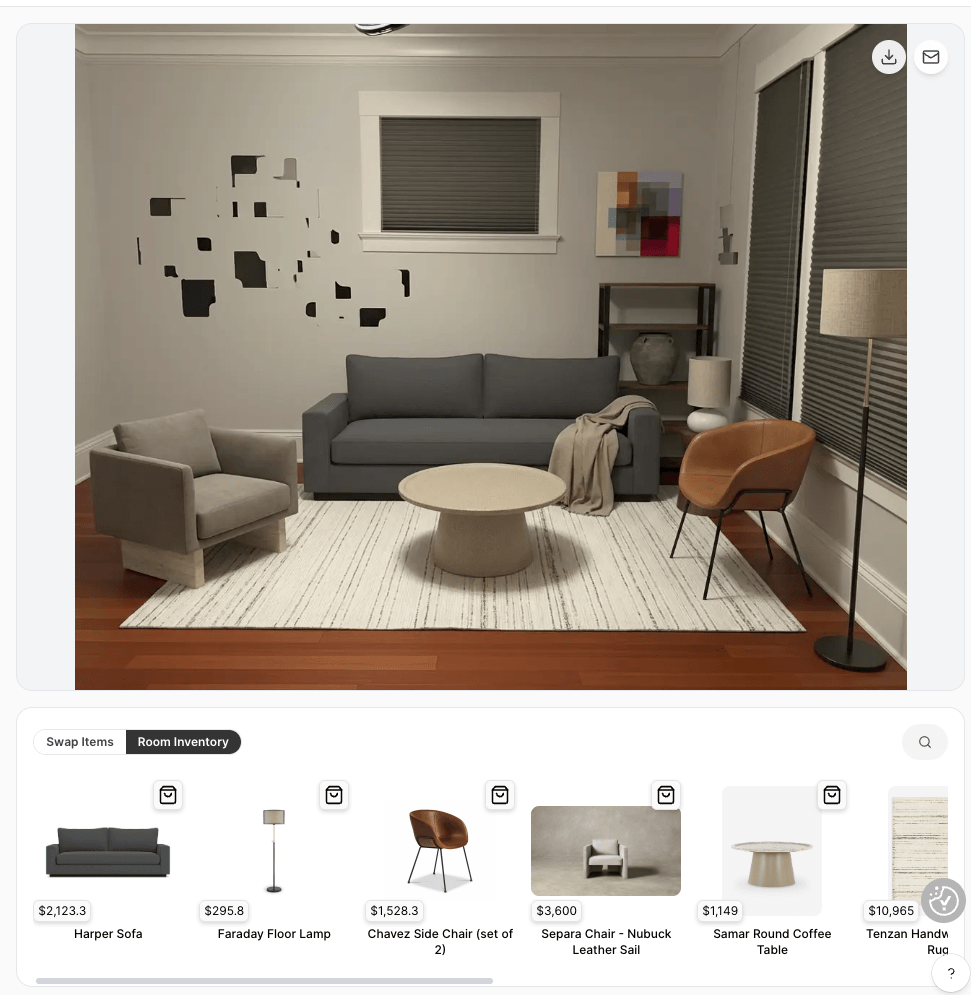
Palazzo, an AI room planning tool that removes furniture from your photo, gave us this rendering of our new furniture choices, but couldn’t quite remove the framed art from the original photo.
VisualizeAI
VisualizeAI aims to reimagine interiors and exteriors for budding designers and pros. Goes beyond interior design and can help you visualize products, architecture, and even fashion design. You can generate three designs for free; after that, you’ll need to choose the basic or pro plan. Upload your image (sketch, elevation, photo), pick the room style, and provide optional instructions on what you want and what to exclude. Pick from over 30 styles—all with sample images. We didn’t add additional details so we could see what it generates for a modern makeover. We got three picks, all similar, but only one has the windows correctly placed in the room.
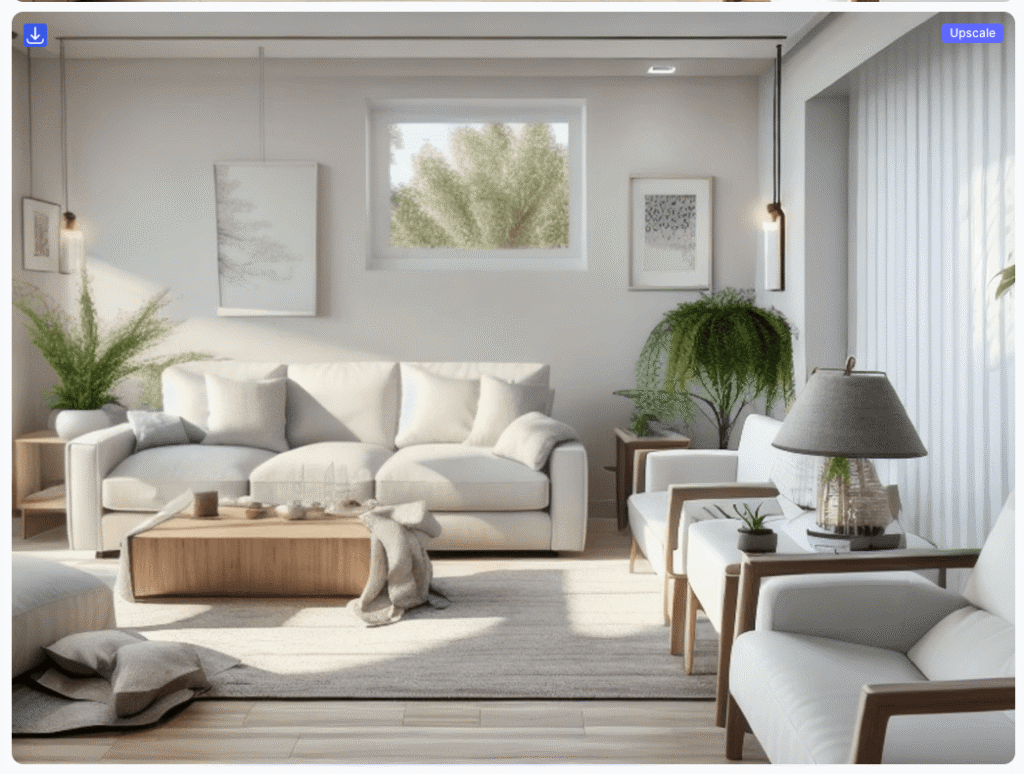
Visualize.ai gave this modern makeover rendering for our living room.
RoomGPT
This before-and-after tool offers one free generation. Upload the image, select a room, quality, and up to four themes. Since you only get one credit, we could only pick one theme: professional. The nice thing about RoomGPT is that it shows examples of the styles. The result was a reimagining of the space, but we could still see the existing wall sconces under the suggested new lamps. It also didn’t change the room’s layout.

RoomGPT provided this one free rendering with a bit of a halo effect of our redesigned living room.
The Bottom Line on AI Room Planners
Is AI putting designers out of work anytime soon? Definitely not. Can these tools make their jobs a little easier? Absolutely. As is the case with most AI scenarios, it’s all about how you use it. If you know how to prompt for design, the LLMs are easier to use and have more flexibility than the AI room planners. That said, most of these room planners are still in that fun-to-use stage. However, some could become useful instruments in a designer’s toolbox. As it stands now, 3D room planners are more interactive and useful.
3D room planning software trusted by top furniture and DIY retailers
Leading furniture and DIY retailers trust 3D Cloud’s room planning and visualization software. 3D Cloud offers a scalable platform for creating immersive, high-performing 3D room planners and other 3D features like 3D product configurators, 360 spins, WebAR, and product renders.
If you are a retailer or manufacturer evaluating room planners, you may be asking yourself which type to invest in. While there is some overlap in the use cases of consumer and in-house interior design teams, each has unique needs. The best place to look is at the leaders. For instance, the Raymour & Flanigan 3D Room Planner supports template rooms with Design from Photo, a mobile experience, buyable products, in-planner configuration of products such as sectionals (in some cases), and real-time pricing with add-to-cart for a no-training-required self-service design experience.
I also learned that 3D Cloud offers a specialized room planner for in-house professional interior design teams at retailers that offer design services. The enterprise planners for kitchens, bathrooms, and furniture offer ProCamera tools with custom camera views and lighting controls, as well as instant 2k to 8k renders. Designers also love the measurement features, BOM generation, and the designer dashboard.
If you’re seeking a seasoned team with a robust 3D digital asset management platform to deliver scalable, high-quality 3D product experiences, you’ll want to talk to the experts at 3D Cloud.